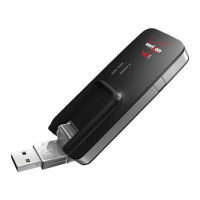
USB730L AT Command Reference Guide 7
1
Introduction
This document lists and describes the AT Command Set to be used in conjunction with the Novatel
Wireless Global Modem USB730L.
Platform Reference and Use
In this document, the device may be referred to using various terms, such as MS (Mobile Station),
TA (Terminal Adapter), DCE (Data Communication Equipment), or ME (Mobile Equipment).
You can control the device on a DTE (Data Terminal Equipment) platform by issuing the AT
commands through a serial interface.
Command Syntax
The attention or “AT” prefix is required prior to entering any command. All commands require a
carriage return or <CR> following the entry of the command. All command responses are
encapsulated by a carriage return and line feed or <CR><LF>. The ASCII display of these
characters is suppressed with only the modem response being presented.
In addition to terminating AT commands, you can use the carriage return <CR> to abort commands
that are executing.
Most AT commands complete immediately so there is no opportunity to abort them, for instance
ATI. However, some commands like AT+COPS or AT+CFUN can take several seconds to
complete. The AT command interface is said to be in execution mode when a command is running
and has not returned a result code (OK/ERROR). A second <CR> entered while the AT command
interface is in execution mode aborts the command and returns the interface to command mode.
Some AT commands require additional input, for instance AT+CMGS. After terminating the
AT+CMGS command with a <CR> the AT command interface enters line edit mode. While in line
edit mode all characters are accepted except CNTL-Z. CNTL-Z terminates line edit mode and the
AT command interface enters execution mode. Like before, at this point another <CR> aborts the
command.


 To Next Page