Need help?
Do you have a question about the Novint Falcom and is the answer not in the manual?
Information regarding seizures triggered by light flashes or patterns while playing PC games.
Guidance to avoid muscle strain, joint pain, skin irritation, and eyestrain from gameplay.
Advice for players experiencing dizziness or nausea during gameplay.
Ensures only approved software and accessories are used with the Falcon to prevent damage or injury.
Precautions against electric shock, including lightning storm usage and power supply handling.
Addresses potential interference with medical devices like pacemakers due to radio waves.
General guidelines for safe and proper operation, maintenance, and handling of the Novint Falcon.
Alerts users about potential screen damage from static images during gameplay.
Instructions for handling and storing game discs to ensure optimal read performance.
Guidance for parents on determining Falcon appropriateness for children and supervision needs.
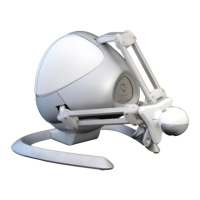
Lists the items included in the Novint Falcon package for user verification.
Instructions on how to safely remove and handle the Novint Falcon from its packaging.
Step-by-step guide on how to connect a Falcon Grip to the device base.
Detailed instructions for installing the Novint Falcon driver software on your PC.
Steps to create a system restore point before installing third-party software.
Instructions for installing the Novint game software, including N VeNT and bundled games.
Instructions for connecting the Falcon to the computer via USB and to power.
Information on the included and available interchangeable Falcon Grips for different game functionalities.
Recommendations for comfortable and ergonomic setups to prevent fatigue and injury.
Important warnings about rough movements, force, and leaving children unattended.
Ensuring software is updated and system meets minimum requirements to resolve issues.
Simple steps like unplugging and replugging the USB cable to fix common issues.
Instructions on running the Falcon Test utility to diagnose hardware and driver problems.
Guidance on understanding Falcon Test outputs, including Homing box and arm movements.
How to test motors and encoders using Falcon Test for proper operation.
Step-by-step guide for manually installing Falcon drivers in Windows XP via Device Manager.
Step-by-step guide for manually installing Falcon drivers in Windows Vista via Device Manager.
Contact details including phone, email, and operating hours for customer support.
Provides general contact email and the physical mailing address for Novint Technologies.
 General
| Brand | Novint |
|---|---|
| Model | Falcom |
| Category | Video Game Controller |
| Language | English |

 To Next Page