– 47 –
3.3 Noise caused by induction
When using an induction hob, all kinds of noises may occur.
These noises are dependent on the construction and the
materials of the bottom of the cooking utensils.
Humming
This occurs when cooking at a higher power and this is caused
by the amount of energy that is transferred from the hob to the
cooking utensils. The noise disappears or becomes weaker
when you set the hob to a lower position.
Sputtering
This noise occurs when the utensils consist of layers of different
materials. The noise is caused by vibrations in the areas where
the different material layers touch each other.
Whistling
Such noises generally arise when cooking with utensils
consisting of layers of different materials and when two adjacent
cooking zones are used simultaneously at maximum power.
The whistling noise disappears or becomes weaker when you
set the hob to a lower position.
Clicking
At lower power positions clicking noises may occur at electronic
switches.
Buzzing
A buzzing sound may occur when the fan is switched on. This
fan cools the electronics at intensive use of the hob. When the
temperature is too high, the fan will keep running after the hob
has been switched off.
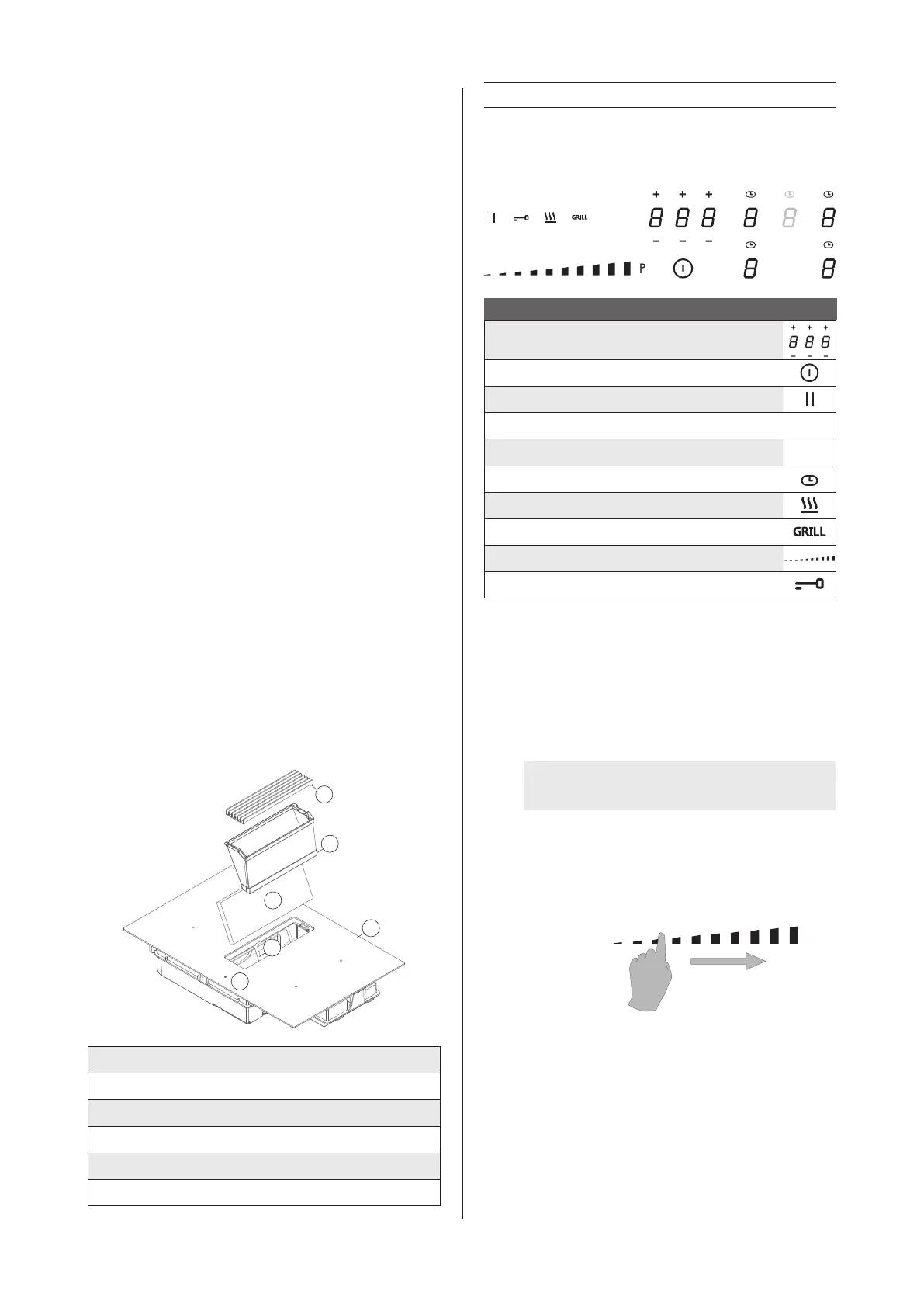
3.4 Global overview
1
4
6
5
3
2
1 Inlet grille
2 Grease lter
3 Monoblock lter (1861 only)
4 Monoblock lter frame (1861 only)
5 Induction hob
6 Controls
4 INDUCTION HOB
4.1 Controlling the induction hob
Hob control
Indication of the timer time
Switch hob on/off
Stop & Go control key
Zone selection key
8
Flexzone indicator
u
Power level indication Timer indication
Keep warm function key
Grill function
Slider control indication
Lock key
4.2 Control keys and slide operation
The device is equipped with touch control keys with which you
can set the various functions. Touching the control key operates
the function. Activating a function will cause a light, reading
and/or sound signal to be displayed.
WARNING: Do not push multiple control keys
simultaneously during normal use.
In order to select power, simply glide your nger over the slider,
on the LED indication.
You can also access a certain level directly by using your nger
to select the desired level.
Zone for slider control


 To Next Page