OPERATION 7. HOW TO USE BASIC FUNCTION
7. HOW TO USE BASIC FUNCTION
VARICAM can operate easily with operation instruction of this chapter.
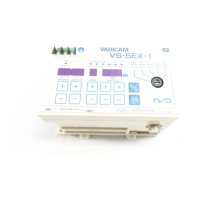
7-1. Nomenclature and Function of the Panel Side
Describes nomenclatures and functions of the panel side
①
Mode indicator (RUN, SET, PRM)
② System ready indicator
③
④ ON/OFF indicator
⑤
Program selection indicator
(Serial communication indicator)
⑲ CLR key
⑱
⑰ ON/OFF key
⑯
⑮ POSITION key (units: 0.5°)
⑭
°
⑬ DOG key
⑫ SW / PRM key
⑪
(Not available for VS-5F, VS-5F-1.)
⑩
●Control key
●LED indicator
⑨
Position
●7-segment LED display
⑥
Program No.
(Not available for VS-5F(-1).)
⑦
Switch/ Parameter No.
⑧
Dog No.


 To Next Page