Home
Nuband
Fitness Trackers
PRO GPS
Page 39 (App Permission)
Nuband PRO GPS - App Permission
50 pages
Manual
Save Page as PDF
To Next Page
To Next Page
To Previous Page
To Previous Page
Loading...
- 39 -
L)
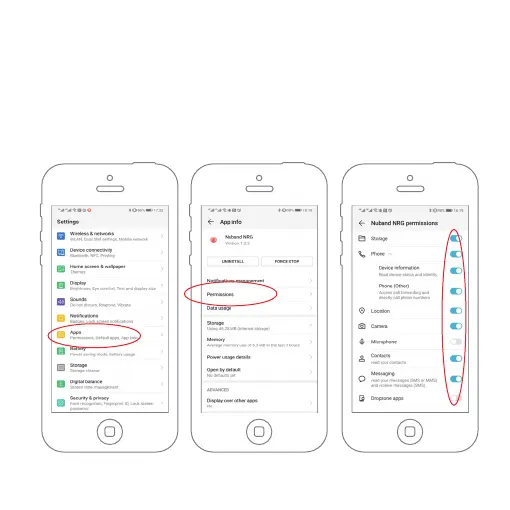
APP PERMISSION
Please ensure the permission of Storage, Location, Phone call, Camera,
Message, Contacts and Microphone are allowed, then the device or app
can execute any notifications.
Setting—Apps—Nuband NRG—Permissions
38
40
Table of Contents
Main Page
Default Chapter
3
Table of Contents
3
Getting Started
6
What Can My Nuband Pro GPS Do
6
Setting up Your Nuband Pro Gps
8
Using the Device
10
Lighting the Screen
11
Wearing the Device and Heart Rate Tracking
12
Recognize Your Device
13
Sleep Tracking
16
Recording a Timed Activity
16
How to Use the Apps
19
Dashboard
23
Steps
24
Calories
24
Distance
24
Heart Rate
25
Exercise Time
25
Intensive Minutes
25
Sleep Tracking
26
Exercise Record
27
Activities
28
Health Board
29
Device Settings
30
Device Management
30
Personal Information
30
Setting Your Goal
31
Monitor the Health Automatically
32
Setting Your Band under Device Setting
33
Sedentary Reminder
33
Other Event Reminder
34
Notification
34
Capture Photo
35
Wrist on
35
Phone Finding
35
Sync Data to Apple Health
36
Firmware Update
36
GPS Update
37
Factory Mode
38
Feedback
38
App Permission
39
Nuband Pro Gps Compatibility
40
Specifications
41
Nuband Pro Gps 12 Month Warranty
42
Nuband Pro Gps Product Disclaimer
44
Returns
45
Fcc Statement
47
Related product manuals
Nuband NU-G0043
56 pages
Nuband NU-G0040
24 pages
Nuband Evolve NU-G0011
22 pages
Nuband Gympal Pro Everlast
14 pages
Nuband EVOLVE
16 pages
Nuband FLASH HR 2
56 pages
Nuband ACTIVE 3
24 pages
Nuband FLASH HR 3
50 pages
Nuband HR63
58 pages


 To Next Page