GB
- 38 -
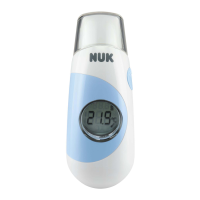
6. Read off the temperature measured in
the LCD display
3
.
7. Press and hold the SCAN button
2
to
update the measurement constantly.
The device automatically switches to
“Room temperature” mode after approx.
one minute.
5.5 Measuring room temperature
If the thermometer is not operated for
around 1 minute, the device automatically
switches to “Room temperature” mode.
The symbol ( ) and the room
temperature measured appear
on the LCD display
3
.
5.6 Previous measurement
For every new temperature
measurement, the result from
the previous measurement will
be shown for comparison at
the top of the LCD display
3
.
5.7 Memory (25 entries)
1. With the device switched on, press the
Standby (ON/MEM) button
7
simultaneously.
Memory 1 appears and
displays the last temperature
measurement when the
button is released.
2. Pressing the button again in this way
displays the previous 25 temperature
measurements performed.
The memory is represented in
the LCD display
3
by the
adjacent symbol.
5.8 Switching between °C and °F
1. If the device is in “Room temperature”
mode, press and hold the SCAN button
2
whilst simultaneously pressing the ON/
MEM button
7
for 3 seconds.
The character in the LCD display
3
changes: “
°C
” to “
°F
”.
36.8


 To Next Page