EN
Recalibrating Harmony
™
If system operation is inconsistent
or incorrect, your Harmony system
may need to be recalibrated.
To do this:
Turn system power on
Pedal the bicycle lightly
through the entire calibration
procedure (preferably on a
stand with the rear wheel off
the ground):
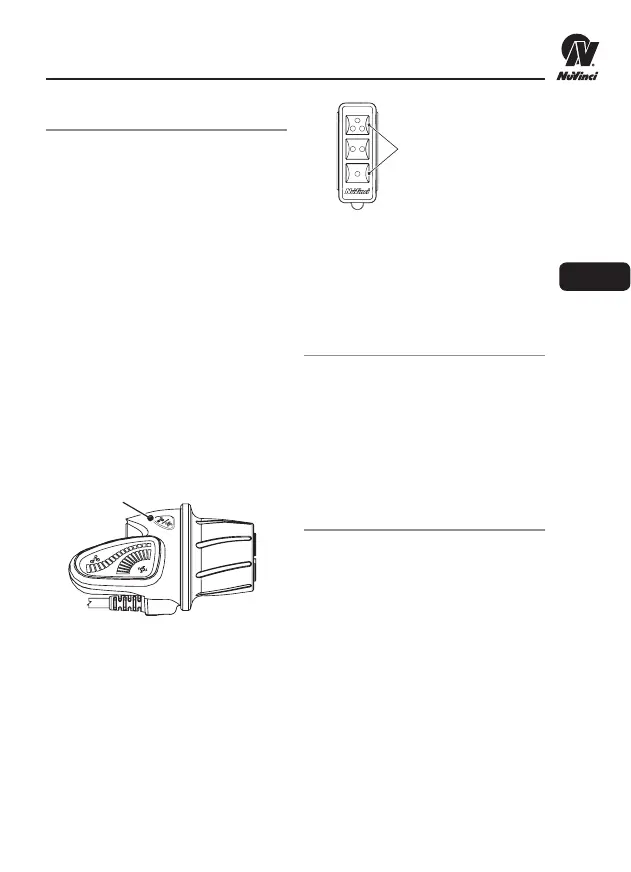
Advanced Controller: Hold
down the “Mode” Button
until the rear hub begins
shifting (5-7 seconds
typically), then release
the button.
Base Controller: Press and
hold the Top and Bottom
buttons simultaneously until
the rear hub begins shifting
(5-7 seconds typically), then
release the buttons.
Continue pedaling lightly while
the system shifts from “low” to
“high” ratio multiple times and
completes calibration.
Upgrading
If the rider wishes to upgrade
from the Base Controller to the
Advanced Controller at a later
date, it’s a simple “plug and play”
installation. Contact your dealer or
NuVinci for more details.
Troubleshooting
Contact your dealer if there are
questions as to how the Harmony
system operates for your bicycle.
Please visit our website for up-to-
date product and troubleshooting
information:
www.nuvinci.com/harmony
THE NUVINCI
®
HARMONY
™
SYSTEM
3
Mode Button
Top & Bottom Buttons
Harmony Base Controller


 To Next Page