EN
BASIC MAINTENANCE AND CARE
6
Loosen and remove the axle
nuts (2) and the no-turn washers (3).
For rim and roller brake
applications, disconnect the
rear brake according to the
manufacturer’s instructions.
Remove the rear wheel.
Some bicycles may require rotat-
ing the CVP Axle and Harmony
or Harmony H|Sync Hub Interface
to allow removal of the bicycle
chain.
In some cases, it is easiest to
remove the chain from the front
chain ring to ease rear wheel
removal.
Disconnecting the
Rear Wheel
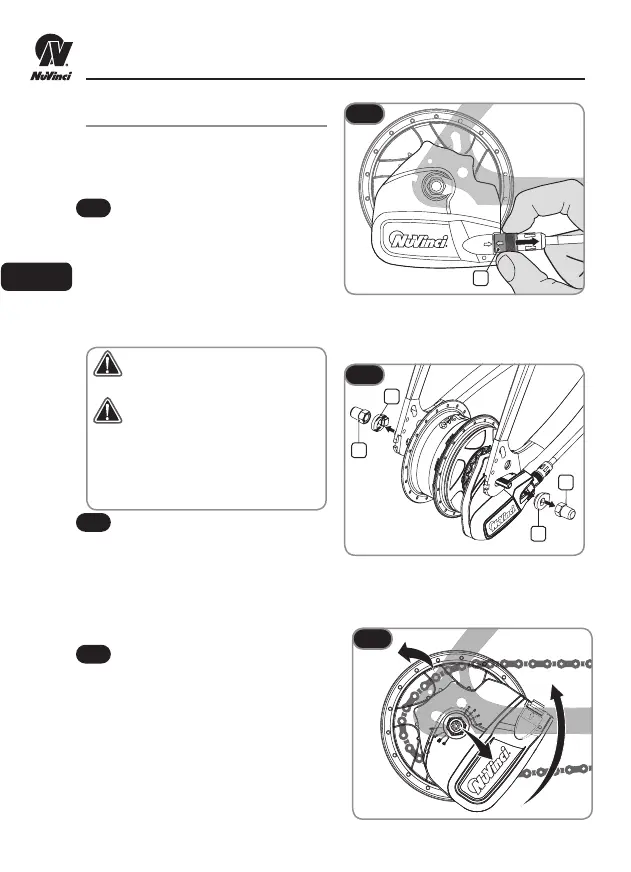
Switch eBike power “off” and
disconnect the eBike battery
(if possible).
Remove the Harmony or Har-
mony H|Sync Main Connector at
the rear wheel.
Grab the connector at the
ribbed location (1) and pull
lightly away from the
Harmony or Harmony H|Sync
Hub Interface.
1
2
3
Do not pull on the cable, only
at the ribbed connector half
as shown.
The connector supplies electri-
cal power to the Harmony or
Harmony H|Sync unit. Protect
the connector from water or
other conductive elements when
disconnected, as shock or dam-
age to the system could result.
1
1
2
3
1
2
2
3
3



 To Next Page