18 | nuwavenow.com
CARE & MAINTENANCE
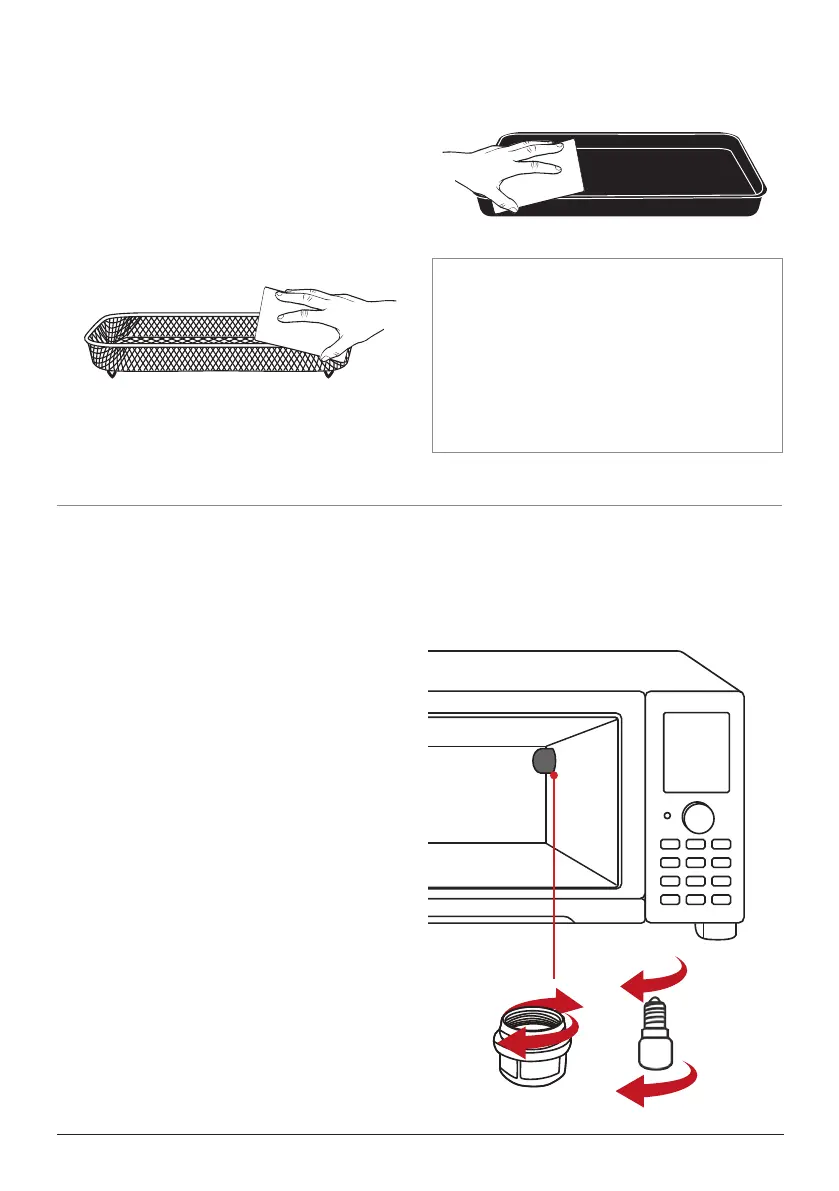
IMPORTANT - Do not immerse the
Bravo in water or attempt to cycle
through dishwasher. The outer surface
may be cleaned by wiping carefully
with a damp dishcloth or sponge.
Make sure unit has cooled completely
prior to cleaning.
Storage
• Unplug the Bravo and let unit cool down
completely.
• Make sure that all parts are cleaned and
dry.
• Never wrap the cord around the Bravo.
REPLACING THE LIGHT BULB
Replacing the Light Bulb
1. Unscrew the light bulb cover turning
counter-clockwise (turning to left).
2. Then unscrew the light bulb turning
counter-clockwise(turning to left).
3. With the replacement bulb, screw turn-
ing clockwise (turning to the right) until
tightened.
4. Then screw in the light bulb cover
clockwise (turning to the right).




 To Next Page