EasyManua.ls Logo

NuWave Nutri-Pot 10Q - Page 25

NuWave Nutri-Pot 10Q
100 pages
Print Icon
To Next Page IconTo Next Page
To Previous Page IconTo Previous Page
Loading...
25
Owners Manual
FUNCTIONS (Continued)
beans
poultry
meat/
stew
soup
multi
grain
rice
canning
start/stop
bake
potatoes
steam/
veggies
sh
Pressure Cooker UI
time
texture
delay
warm
sear
slow
cook
delay manual
less normal more
minutes
hours
beans
poultry
meat/
stew
soup
multi
grain
rice
canning
start/stop
bake
potatoes
steam/
veggies
sh
Pressure Cooker UI
time
texture
delay
warm
sear
slow
cook
delay manual
less normal more
minutes
hours
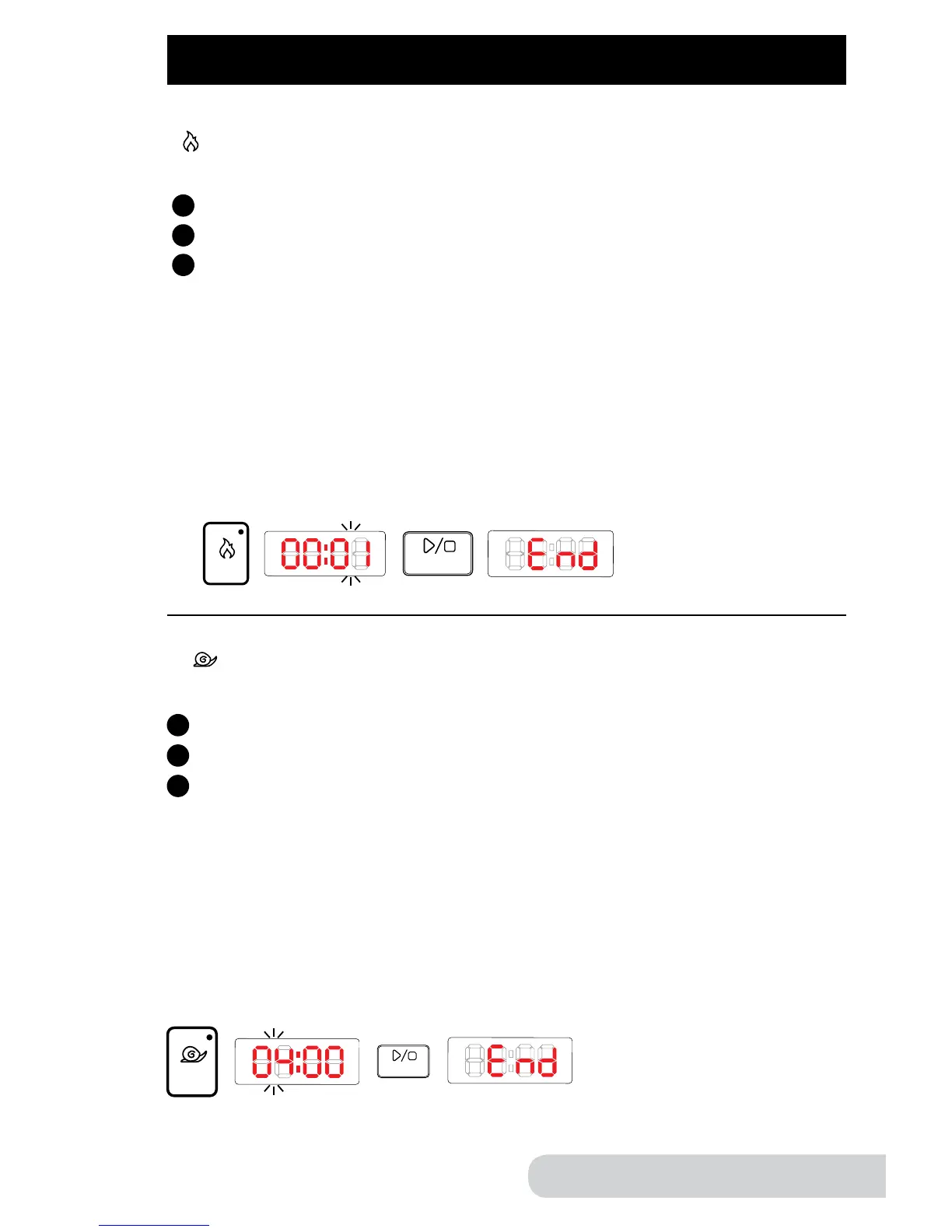
Sear: This function lets you “sear” your food before cooking under pressure
or before using the slow cook function.
Directions:
Press “sear” button. Display will show "00:05".
Press “start/stop” button to begin.
See “hours/minutes” section for manually adjusting the time.
Note:
Do not close the lid when using “sear” function. Unit will not operate in
"sear" function if lid is closed.
Use optional glass lid when using slow cook function.
The minimum time is 1 minute (00:01).
The maximum time is 20 minutes (00:20).
When complete, the display will show “End”.

beans
poultry
meat/
stew
soup
multi
grain
rice
canning
start/stop
bake
potatoes
steam/
veggies
sh
Pressure Cooker UI
time
texture
delay
warm
sear
slow
cook
delay manual
less normal more
minutes
hours
1
2
3
Example:
Example:
beans
poultry
meat/
stew
soup
multi
grain
rice
canning
start/stop
bake
potatoes
steam/
veggies
sh
Pressure Cooker UI
time
texture
delay
warm
sear
slow
cook
delay manual
less normal more
minutes
hours
beans
poultry
meat/
stew
soup
multi
grain
rice
canning
start/stop
bake
potatoes
steam/
veggies
sh
Pressure Cooker UI
time
texture
delay
warm
sear
slow
cook
delay manual
less normal more
minutes
hours
Slow Cook: This function lets you cook various recipes slowly at
low temperatures.
Directions:
Press “slow cook” button. Display will show "04:00".
Press “start/stop” button to begin.
See “hours/minutes” section for instructions on adjusting the time.
Note:
Do not close the lid when using “slow cook” function. Unit will not operate in
"slow cook" function if lid is closed.
Use optional glass lid when using slow cook function.
The minimum time is 2 hours (02:00).
The maximum time is 9 hours (09:00).
When complete, the display will show “End”.
beans
poultry
meat/
stew
soup
multi
grain
rice
canning
start/stop
bake
potatoes
steam/
veggies
sh
Pressure Cooker UI
time
texture
delay
warm
sear
slow
cook
delay manual
less normal more
minutes
hours
1
2
3

Related product manuals