* USB AUDIO/USS MIDI
1.
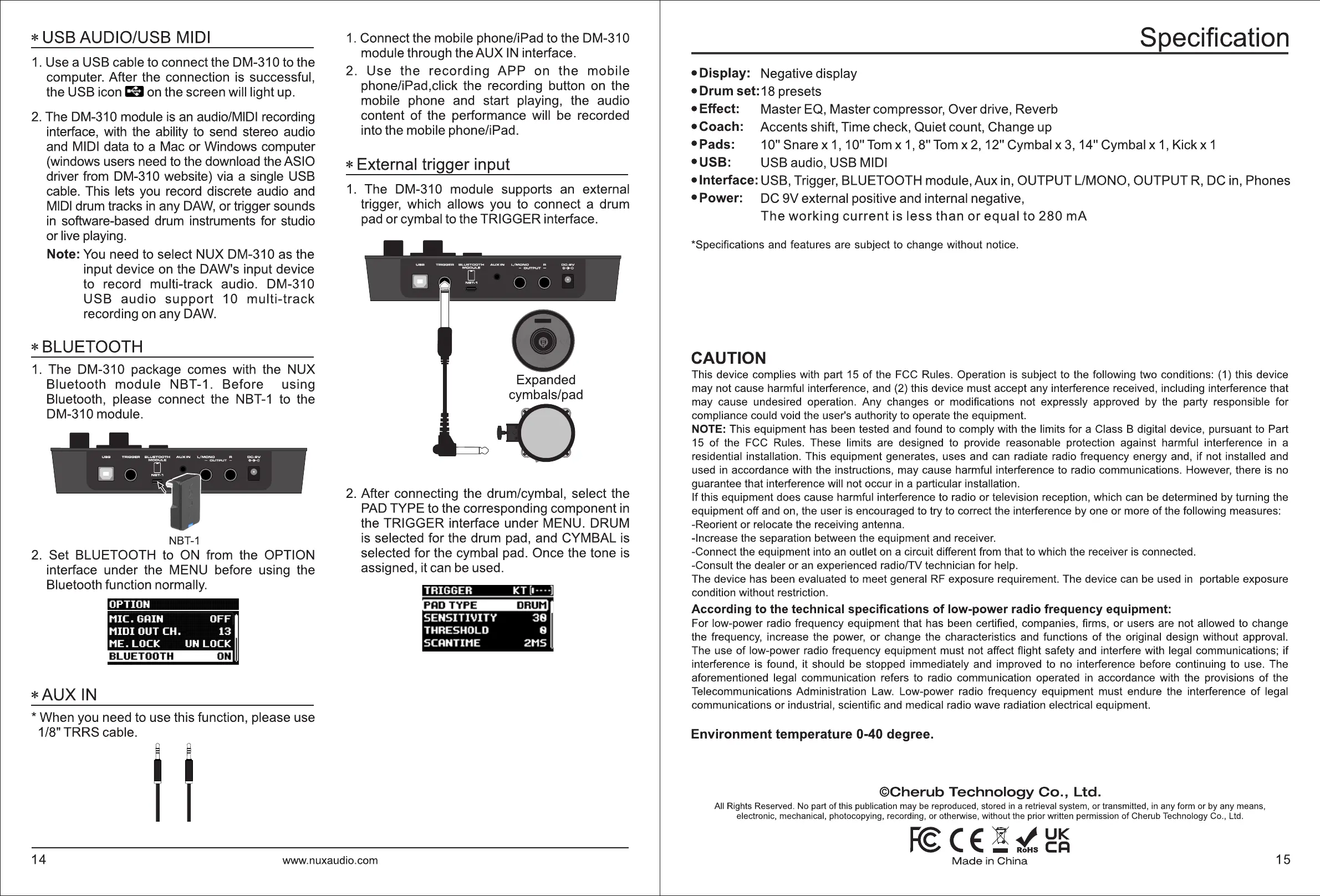
Use a USB cable to connect the DM-310 to the
computer. After the connection
is
successful,
the USB icon
Ea
on
the screen will light up.
2.
The DM-310 module
is
an
audio/MIDI recording
interface, with the ability to send stereo audio
and MIDI data to a Mac or Windows computer
(windows users need to the download the ASIO
driver from DM-310 website) via a single USB
cable. This lets you record discrete audio and
MIDI
drum tracks
in
any
DAW,
or trigger sounds
in
software-based drum instruments for studio
or live playing.
Note:
You
need to select NUX DM-310 as the
input device
on
the DAW's input device
to record multi-track audio. DM-310
USB
audio
support
10
multi-track
recording
on
any
DAW.
*BLUETOOTH
1.
The DM-310 package comes with the NUX
Bluetooth module NBT-1. Before using
Bluetooth, please connect the
NBT-1
to the
DM-310 module.
NBT-1
2.
Set BLUETOOTH to
ON
from the OPTION
interface under the MENU before using the
Bluetooth function normally.
OPTION
*AUX
IN
* When you need to use this function, please use
1/8" TRRS cable.
1.
Connect the mobile phone/iPad to the DM-310
module through the AUX
IN
interface.
2. Use
the
recording
APP
on
the
mobile
phone/iPad,click the recording button
on
the
mobile phone and start playing, the audio
content
of
the performance will be recorded
into the mobile phone/iPad.
* External trigger input
1.
The DM-310 module supports an external
trigger, which allows you to connect a drum
pad or cymbal to the TRIGGER interface.
Expanded
cymbals/pad
.a
2.
After connecting the drum/cymbal, select the
PAD
TYPE to the corresponding component
in
the TRIGGER interface under MENU. DRUM
is
selected for the drum pad, and CYMBAL is
selected for the cymbal pad. Once the tone is
assigned, it can be used.
14
www.nuxaudio.com
Specification
• Display: Negative display
• Drum set: 18 presets
• Effect: Master EQ, Master compressor, Over drive, Reverb
•Coach: Accents shift, Time check, Quiet count, Change up
•Pads:
10" Snare x
1,
10"
Tom
x
1,
8"
Tom
x
2,
12" Cymbal x
3,
14" Cymbal x
1,
Kickx
1
•USB: USB audio, USB MIDI
• Interface: USB, Trigger, BLUETOOTH module, Aux
in,
OUTPUT L/MONO, OUTPUT
R,
DC
in,
Phones
• Power:
DC
9V external positive and internal negative,
The
working
current
is
less
than
or
equal
to
280
mA
*Specifications and features are subject to change without notice.
CAUTION
This device complies with part 15
of
the FCC Rules. Operation is subject to the following two conditions: (1) this device
may not cause harmful interference, and (2) this device must accept any interference received, including interference that
may cause undesired operation.
Any
changes
or
modifications not expressly approved by the party responsible for
compliance could void the user's authority to operate the equipment.
NOTE: This equipment has been tested and found to comply with the limits for a Class B digital device, pursuant to Part
15
of
the FCC Rules. These limits are designed to provide reasonable protection against harmful interference
in
a
residential installation. This equipment generates, uses and can radiate radio frequency energy and,
if
not installed and
used
in
accordance with the instructions, may cause harmful interference to radio communications. However, there is no
guarantee that interference will not occur in a particular installation.
If this equipment does cause harmful interference to radio
or
television reception, which can be determined by turning the
equipment off and on, the user is encouraged to try to correct the interference by one
or
more
of
the following measures:
-Reorient
or
relocate the receiving antenna.
-Increase the separation between the equipment and receiver.
-Connect the equipment into an outlet on a circuit different from that to which the receiver is connected.
-Consult the dealer
or
an experienced radio/TV technician for help.
The device has been evaluated to meet general RF exposure requirement. The device can be used
in
portable exposure
condition without restriction.
According to the technical specifications
of
low-power radio frequency equipment:
For low-power radio frequency equipment that has been certified, companies, firms,
or
users are not allowed to change
the frequency, increase the power,
or
change the characteristics and functions
of
the original design without approval.
The use
of
low-power radio frequency equipment must not affect flight safety and interfere with legal communications;
if
interference is found, it should be stopped immediately and improved to no interference before continuing to use. The
aforementioned legal communication refers to radio communication operated
in
accordance with the provisions
of
the
Telecommunications Administration Law. Low-power radio frequency equipment must endure the interference
of
legal
communications
or
industrial, scientific and medical radio wave radiation electrical equipment.
Environment temperature 0-40 degree.
©Cherub
Technology
Co.,
Ltd.
All Rights Reserved. No part
of
this publication may be reproduced, stored
in
a retrieval system,
or
transmitted,
in
any form or by any means,
electronic, mechanical, photocopying, recording, or otherwise, without the prior written permission
of
Cherub Technology Co., Ltd.
~CE!~~~
Made
in
China
15


 To Previous Page
 Loading...