EasyManua.ls Logo

nux DM-310 - Module Control Panel; The Front Panel; Interface Panel; Connect External Devices

nux DM-310
10 pages
Print Icon
To Next Page IconTo Next Page
To Previous Page IconTo Previous Page
Loading...
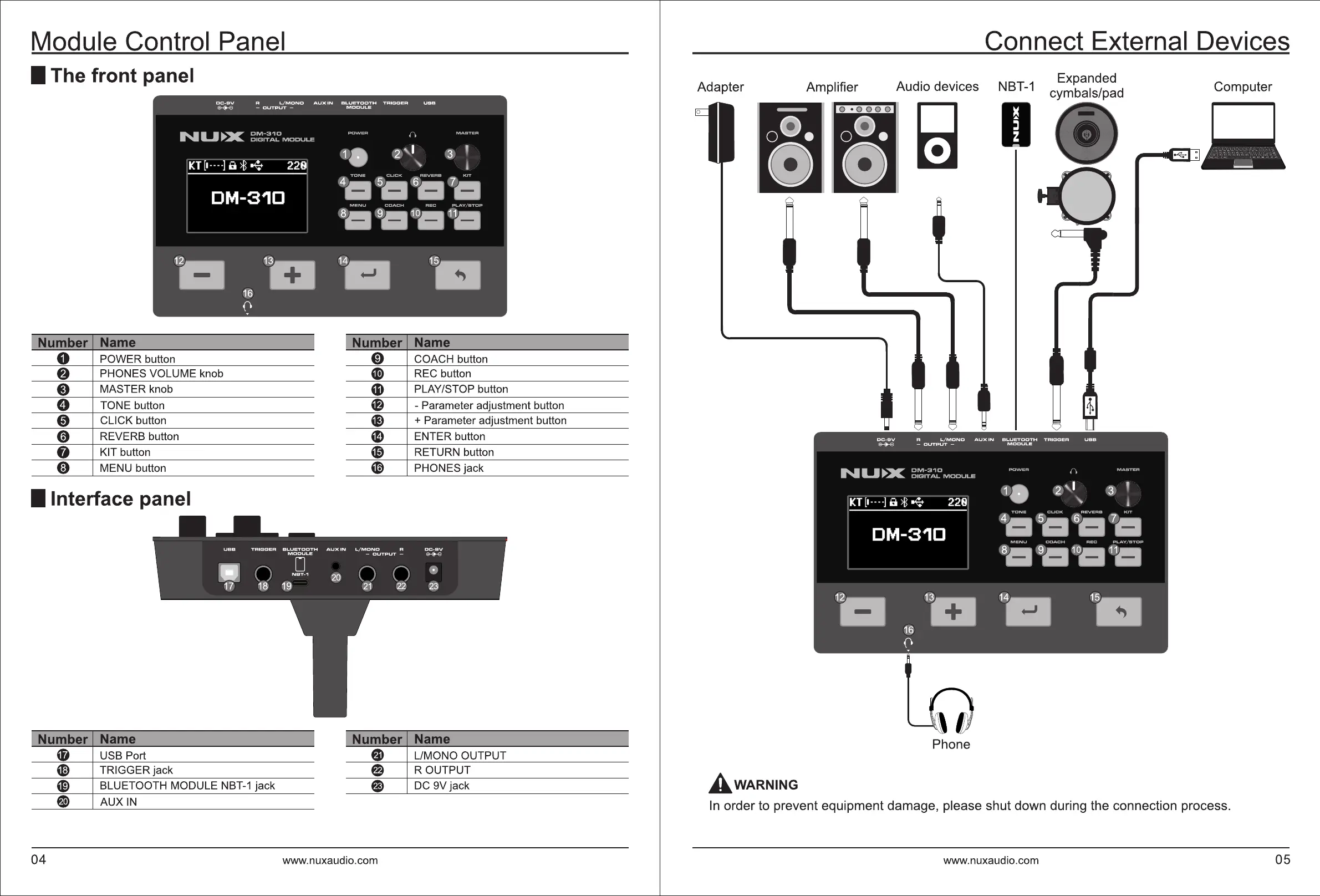
Module Control Panel
Connect External Devices
I The front panel
Adapter Amplifier
Audio devices
Computer
I Number
Name
I
I Number
Name
I
0
POWER button
0
COACH button
f}
PHONES VOLUME knob
~
REC button
6)
MASTER knob
PLAY/STOP button
0
TONE button
@
- Parameter adjustment button
0
CLICK button G) + Parameter adjustment button
0
REVERS button
~
ENTER button
0
KIT button
49
RETURN button
0
MENU button
~
PHONES jack
I Interface panel
I Number
Name
I
I Number
Name
~
USB Port
G
L/MONO OUTPUT
I
Phone
~
TRIGGER jack
e
ROUTPUT
~
BLUETOOTH MODULE NBT-1 jack
e
DC 9V jack
AwARNING
e
AUXIN
In
order to prevent equipment damage, please shut down during the connection process.
04 www.nuxaudio.com www.nuxaudio.com
05

Related product manuals