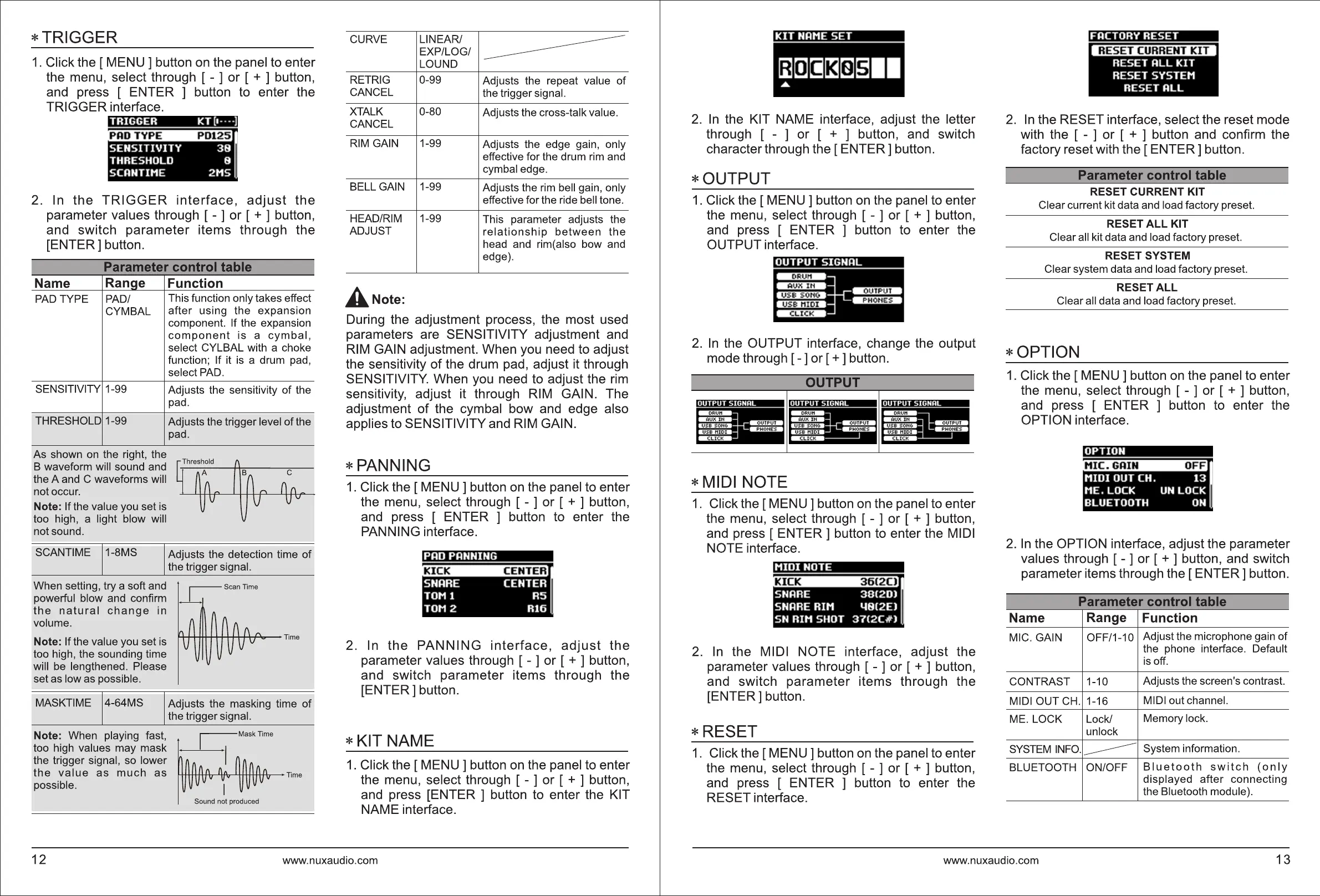
*TRIGGER
1.
Click the
[MENU]
button
on
the panel to enter
the menu, select through [ - ] or [ + ] button,
and press [ ENTER ] button to enter the
TRIGGER interface.
2. In the
TRIGGER
interface,
adjust
the
parameter values through [ - ] or [ + ] button,
and switch parameter items through the
[ENTER] button.
I
Parameter control table
Name
Range
PAD
TYPE PAD/
CYMBAL
SENSITIVITY 1-99
THRESHOLD 1-99
As shown
on
the right, the
B waveform will sound and
the A and C waveforms will
not occur.
Note: If the value you set is
too high, a light blow will
not sound.
SCANTIME 1-8MS
When setting, try a soft and
powerful blow and confirm
the
natural
change
in
volume.
Note: If the value you set is
too high, the sounding time
will
be
lengthened. Please
set as low as possible.
Function
This function only takes effect
after using the expansion
component. If the expansion
component
is
a
cymbal,
select CYLBAL with a choke
function; If it
is
a drum pad,
select
PAD.
Adjusts the sensitivity of the
pad.
Adjusts the trigger level of the
pad.
C
n o
__
Adjusts the detection time
of
the trigger signal.
~Scannme
MASKTIME 4-64MS Adjusts the masking time
of
the trigger signal.
Note: When playing fast, Mask
Time
too high values may mask
the trigger signal, so lower
the
value
as
much
as
........._........,__.......,__,,,'--'--1--1"-l-+l--l>--1--h--Time
possible.
Sound not produced
I
CURVE LINEAR/
EXP/LOG/
LOUND
RETRIG 0-99
Adjusts the repeat value
of
CANCEL
the trigger signal.
XTALK 0-80
Adjusts the cross-talk value.
CANCEL
RIM GAIN
1-99
Adjusts the edge gain, only
effective for the drum
rim
and
cymbal edge.
BELL
GAIN 1-99
Adjusts the
rim
bell gain, only
effective for the ride bell tone.
HEAD/RIM 1-99
This parameter adjusts the
ADJUST
relationship
between
the
head and rim(also bow and
edge).
ANote:
During the adjustment process, the most used
parameters are SENSITIVITY adjustment and
RIM
GAIN adjustment. When you need to adjust
the sensitivity
of
the drum pad, adjust it through
SENSITIVITY. When you need to adjust the
rim
sensitivity, adjust it through
RIM
GAIN. The
adjustment of the cymbal bow and edge also
applies to SENSITIVITY and
RIM
GAIN.
*PANNING
1.
Click the
[MENU]
button
on
the panel to enter
the menu, select through [ - ] or [ + ] button,
and press [ ENTER ] button to enter the
PANNING interface.
SNARE
CENTER
TOM l
R5
TOM 2
Rl6
2. In
the
PANNING
interface,
adjust
the
parameter values through [ - ] or [ + ] button,
and switch parameter items through the
[ENTER] button.
*KIT
NAME
1.
Click the
[MENU]
button
on
the panel to enter
the menu, select through [ - ] or [ + ] button,
and press [ENTER ] button to enter the KIT
NAME interface.
12
www.nuxaudio.com
KIT
NAME
SET
2.
In
the KIT NAME interface, adjust the letter
through [ - ] or [ + ] button, and switch
character through the
[ENTER]
button.
*OUTPUT
1.
Click the
[MENU]
button
on
the panel to enter
the menu, select through [ - ] or [ + ] button,
and press [ ENTER ] button to enter the
OUTPUT interface.
2.
In
the OUTPUT interface, change the output
mode through [ - ] or
[+]button.
DRUH
A
UX
IN
U
SB
S
ONC.
u
se
MIDI
CLICK
*MIDI
NOTE
1.
Click the
[MENU]
button
on
the panel to enter
the menu, select through [ - ] or [ + ] button,
and press [
ENTER]
button to enter the MIDI
NOTE interface.
2.
In
the MIDI NOTE interface, adjust the
parameter values through [ - ] or [ + ] button,
and switch parameter items through the
[ENTER] button.
*RESET
1.
Click the
[MENU]
button
on
the panel to enter
the menu, select through [ - ] or [ + ] button,
and press [ ENTER ] button to enter the
RESET interface.
2.
In
the RESET interface, select the reset mode
with the [ - ] or [ + ] button and confirm the
factory reset with the
[ENTER]
button.
Parameter control table
RESET
CURRENT
KIT
Clear current kit data and load factory preset.
RESET
ALL
KIT
Clear all kit data and load factory preset.
RESET
SYSTEM
Clear system data and load factory preset.
RESET
ALL
Clear all data and load factory preset.
*OPTION
1.
Click the
[MENU]
button
on
the panel to enter
the menu, select through [ - ] or [ + ] button,
and press [ ENTER ] button to enter the
OPTION interface.
2.
In
the OPTION interface, adjust the parameter
values through [ - ] or [ + ] button, and switch
parameter items through the
[ENTER]
button.
I
Parameter control table
I
Name
Range
Function
MIC. GAIN OFF/1-10
Adjust the microphone gain of
the phone interface. Default
is
off.
CONTRAST 1-10
Adjusts the screen's contrast.
MIDI OUT CH. 1-16
MIDloutchannel.
ME. LOCK Lock/
Memory lock.
unlock
SYSTEM
INFO.
-----
System information.
BLUETOOTH ON/OFF
Bluetooth
switch
(only
displayed after connecting
the Bluetooth module).
www.nuxaudio.com
13


 To Next Page
 Loading...