QUIET COUNT
COACH
CLICK
QUIET
COUNT
COACH
CLICK
BEAT
4
RHYTHM }
SOUND 1
QUIET
COUNT
4-4
READY
...
4 - 1
QUIET
COUNT
FINISHED!
SCORE:
90
CHANGE UP
COACH
CLICK
CHANGE
UP
10
COACH
CLICK
BEAT
4
SOUND 1
VOLUME A
CHANGE UP
CHANGE UP
READY ...
CHANGE UP
CHANGE UP
fffffl
~6~
4 - 1
QUIET
COUNT
4-4
QUIET
4 - 1
QUIET
COUNT
QUIET
2
CHANGE UP
CHANGE UP
FINISHED!
4 - 1
CHANGE UP
CHANGE- UP }
MEASURES 8
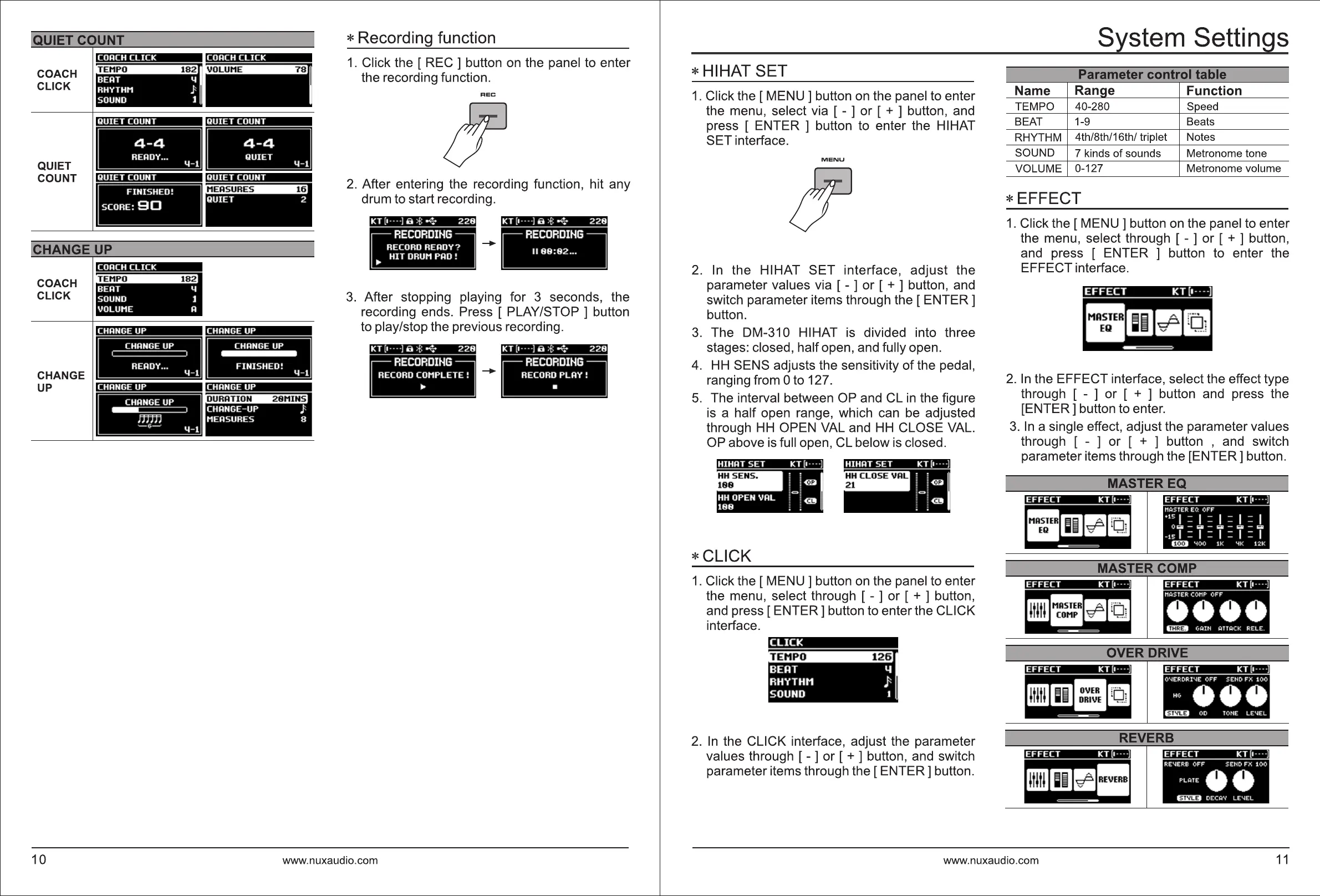
* Recording function
1 . Click the [ REC ] button
on
the panel to enter
the recording function.
REC
2.
After entering the recording function, hit any
drum to start recording.
KT [•
····]
a
>&
4
228
--+-
3.
After stopping playing for 3 seconds, the
recording ends. Press [ PLAY/STOP ] button
to play/stop the previous recording.
KT
[1
----] a
>&
4
228
KT [I
····]
S
>&
4
228
~
--+-
G=J
www.nuxaudio.com
*HIHAT
SET
1.
Click the
[MENU]
button
on
the panel to enter
the menu, select via [ - ] or [
+ ] button, and
press [ ENTER ] button to enter the HIHAT
SET interface.
MENU
2.
In the HIHAT SET interface, adjust the
parameter values via [ - ] or [ + ] button, and
switch parameter items through the [
ENTER]
button.
3.
The DM-310 HIHAT is divided into three
stages: closed, half open, and fully open.
4.
HH
SENS adjusts the sensitivity
of
the pedal,
ranging from Oto 127.
5.
The interval between OP and CL
in
the figure
is
a half open range, which can
be
adjusted
through
HH
OPEN VAL and
HH
CLOSE VAL.
OP above is full open, CL below is closed.
HIHAT
SET
KT [1 · · ·
·]
j ( ~
;
c:::,
~
\ l @
*CLICK
1.
Click the
[MENU]
button
on
the panel to enter
the menu, select through [ - ] or [ + ] button,
and press
[ENTER]
button to enter the CLICK
interface.
BEAT 4
RHYTHM
)
SOUND 1
2.
In
the CLICK interface, adjust the parameter
values through [ - ] or [ + ] button, and switch
parameter items through the
[ENTER]
button.
System Settings
I
Parameter control table
I
Name Ranae Function
TEMPO 40-280 Speed
BEAT 1-9 Beats
RHYTHM
4th/8th/16th/ triplet Notes
SOUND
7 kinds
of
sounds Metronome tone
VOLUME
0-127 Metronome volume
* EFFECT
1.
Click the [ MENU ] button
on
the panel to enter
the menu, select through [ - ] or [ + ] button,
and press [ ENTER ] button to enter the
EFFECT interface.
EFFECT
KT (1----)
MASTER
EQ
2.
In
the EFFECT interface, select the effect type
through [ - ] or [ + ] button and press the
[ENTER] button to enter.
3.
In
a single effect, adjust the parameter values
through [ - ] or [ + ] button , and switch
parameter items through the [ENTER] button.
MASTEREQ
EFFECT
KT [1 · · ·
·]
EFFECT
KT [1----]
M>ISIER
EQ
OFF
M
ASTER
11111::l
cP 1
ltJ;
l
HI
- ~ v ·1 .
..
..
'
15
I = I = I = I = I
O
i=a
-
i=D
-
i=a
-
c:::::D
-
i=a
- 15 I = I = I = I = I
(EI!>
'100
1K
'IK
12K
MASTER COMP
EFFECT
KT [1 · · ·
·]
OVERDRIVE
EFFECT
KT
[1----)
O'<ERORl'<E
OFF
SEtlO
FX
100
Hv
•••
Eil:lD
00
TOtlE
LE'<EL
REVERB
EFFECT
KT
[I
····
]
RE'<ERB
OFF
SENO
FX
1
00
PL>IIE
••
Eil:lD
OEC>IV
LE"EL
www.nuxaudio.com
11



 To Next Page