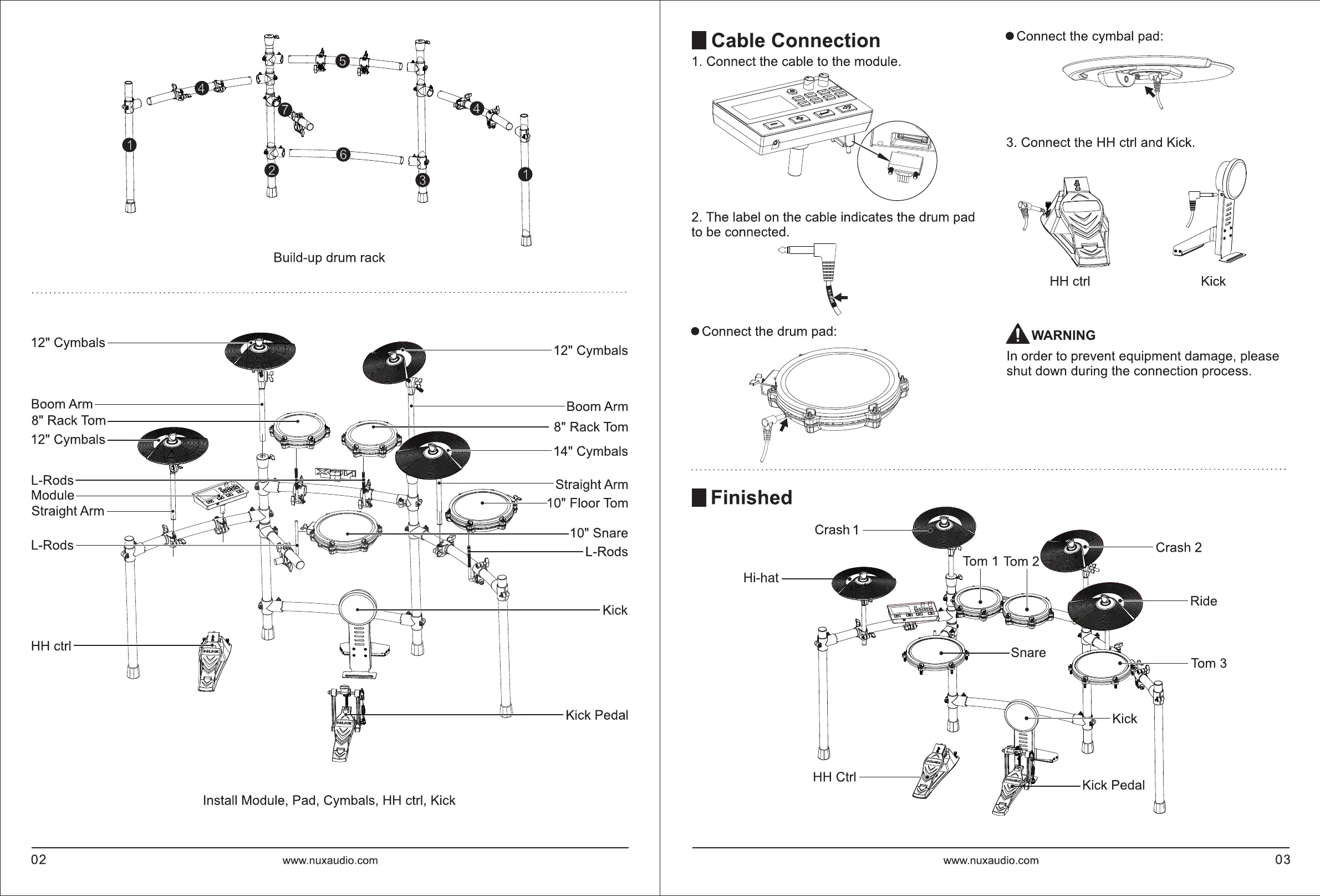
Build-up drum rack
12"
Cymbals-------
,------------12"
Cymbals
Boom Arm
Boom Arm
8" Rack
Tom
LJ
8" Rack
Tom
12" Cymbals
•
14" Cymbals
L-Rods
Module
I
Straight Arm
Straight Arm
I
1 0" Floor
Tom
~
10" Snare
L-Rods
L-Rods
~
Install Module, Pad, Cymbals,
HH
ctrl, Kick
02
www.nuxaudio.com
I Cable Connection
• Connect the cymbal pad:
1.
Connect the cable to the module.
3.
Connect the
HH
ctrl and Kick.
2.
The label
on
the cable indicates the drum pad
~
to be connected.
~,---\\\"'§~ttl
• Connect the drum pad:
I Finished
Crash 1
-------,
Hi-hat----.
HH
ctrl Kick
AwARNING
In
order to prevent equipment damage, please
shut down during the connection process.
f----
Crash 2
1
Tom
,----
Ride
www.nuxaudio.com
03



 To Next Page