15
e700 User Manual
2
Note: By changing the ventilation mode, section 6 of the display will
change accordingly to refl ect the default or set up parameters for
each mode.
3.5. Display
3.5.1. Screen Layout
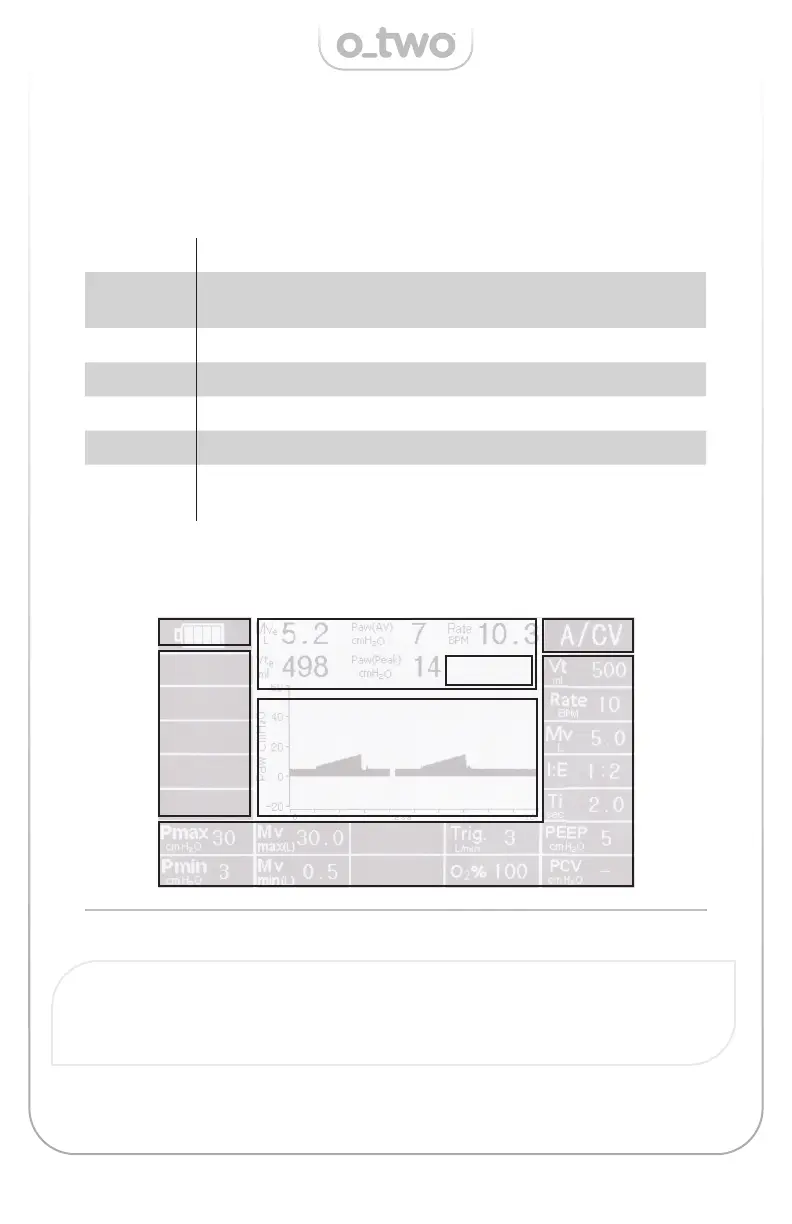
The screen is divided into 7 sections as shown below and each
section is dedicated to display the following parameters:
Figure 04
Section 1: Battery status during charge and discharge.
Section 2:
Live ventilation parameters (Vte, Mve, Paw
peak
, Paw
AV
,
Rate)
Section 3: Ventilation Modes (A/C V, SIMV, BiLVL, CPAP & CPR)
Section 4: Alarms/ Warnings.
Section 5: Ventilation waveforms.
Section 6: Set up parameters
Section 7:
Confi rmation request/ Patient e ort/ Invalid or
Confl ict setting
1
3
7
4
5
6


 To Next Page