9
EN
Connecting Bluetooth devices
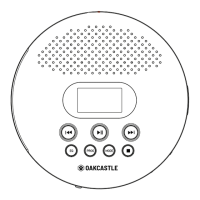
Ref.14) until ‘BLUE’ is
shown on the display.
Ensure that Bluetooth is activated on the device you wish to connect. If this is
available devices on the device you wish to connect.
Select the ‘Oakcastle BX200’ from the list and connect.
When successfully connected, the device will issue a short sound. After this, you
can begin playing music on your device.
Controls and Functions: Bluetooth
Press Play/Pause/Stop/Scan (Ref.7) to play or stop. Press and hold (Ref.7) to
disconnect or reconnect Bluetooth.
Press ‘Previous’ (Ref.8) to skip to previous track.
Press ‘Next’ (Ref.16) to skip to next track.
BLUETOOTH MODE


 To Next Page