6
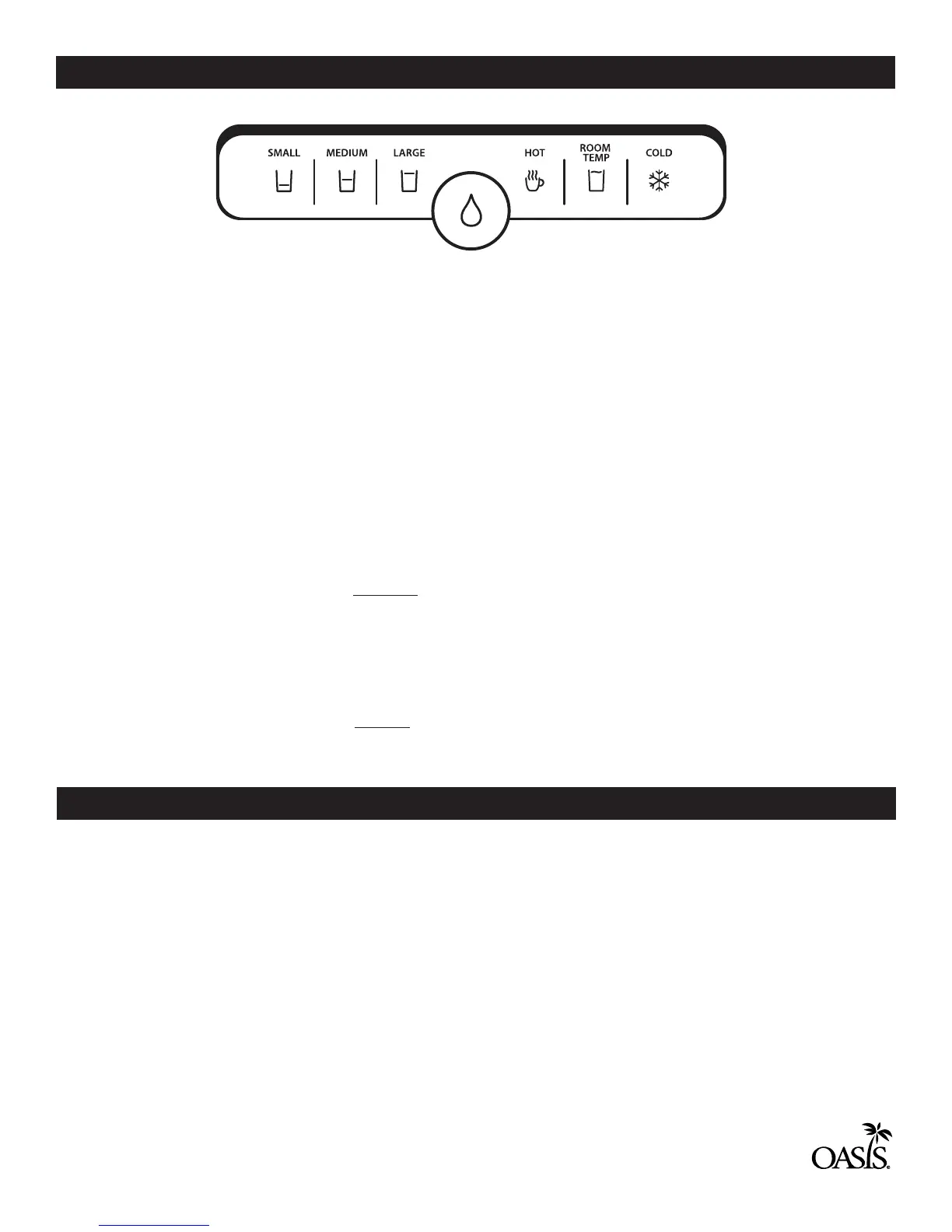
There are two options for dispensing:
1. PRE-SELECT CUP SIZE
The factory settings for the PRE-SELECT cups sizes are as follows:
SMALL = 6 oz (177 ml)
MEDIUM = 10 oz (296 ml)
LARGE = 16 oz (473 ml)
NOTE: These are approximate sizes and may vary slightly.
a. To dispense a PRE-SELECT sized drink, rst choose the desired size on the left side of the control panel. The
selection will remain illuminated. The water drop icon will begin blinking.
b. Next, choose the desired water temperature on the right side of the control panel. The selection will remain
illuminated.
c. Dispense the drink by pressing and releasing the the water drop icon in the center of the control panel.
NOTE: PRE-SELECT cup size does not work for hot water.
2. ANY SIZE DRINK
a. To dispense an ANY SIZE drink, rst select the desired water temperature.
b. Dispense the drink by pressing and holding the the water drop icon in the center of the control panel.
Water will dispense until the icon is released.
The PRE-SELECT cup sizes can be programmed for your favorite bottle or cup sizes.
To program a cup size:
1. Place your container under the water dispense point.
2. Determine the PRE-SELECT cup size that you want to program.
3. Press and hold that icon until it starts to blink. (approximately 5 seconds)
4. Touch the water drop icon to start the dispense and remove your nger.
5. When the desired amount of water is dispensed, touch the water drop icon to stop the dispense.
An audible “beep” will indicate the cup size is programmed.
6. Repeat as desired for the other PRE-SELECT cup sizes.
OPERATION
PROGRAMMING YOUR FAVORITE CUP SIZES
CONTROL PANEL


 To Next Page