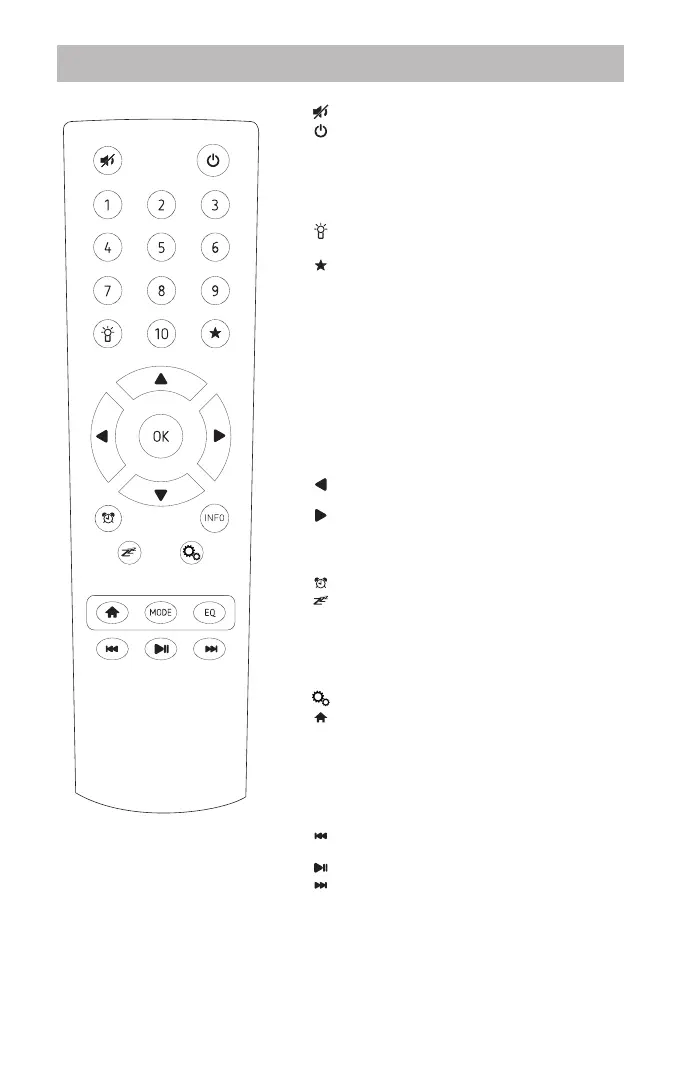
Remote control
: Press to mute the sound.
: Power on/off standby.
1-10: Preset and recall the radio station by
pressing a specific number.
Press and hold the button to store the
station.
Press briefly to recall the station.
: Press to adjust the backlight, there are
three levels available.
: Long pressing to save the playing
station to a specific number at your
choice. Press it briefly to recall the
preset list.
▲ / ▼: Up/Down button, press to scroll up and
down on the menu;
During playback of the radio channel:
Internet radio mode: back to the
internet radio menu.
DAB mode: press ▲ / ▼ return to the
station list.
FM mode: press ▲ / ▼ to fine tune the
frequency.
: Press it to return to previous menu /
left navigation.
: Right navigation / enter into sub menu.
OK: Press to select/confirm an option;
FM mode: press to auto scan the next
available station.
: Press to set the Alarm on the radio
: Set the sleep timer of the radio, press
the button repeatedly to select
The timer period you desire.
INFO: To view the detailed information of the
current playing radio station or music
stream from UPnP.
: To enter the setup wizard.
: Return to the main menu of the radio
mode you are using or exit the
operating menu to playing screen
MODE: Press to enter the menu of the radio
modes.
EQ: Equalizer, press to enter EQ list and
choose the preferred style.
: Previous song (for Bluetooth and
UPnP).
: Play/pause (for Bluetooth and UPnP).
: Next song (for Bluetooth and UPnP).
- 2 -












 To Next Page