- 26 -
12. Remote control via PC / Smart phone
- Tuning internet radio & manage favourites
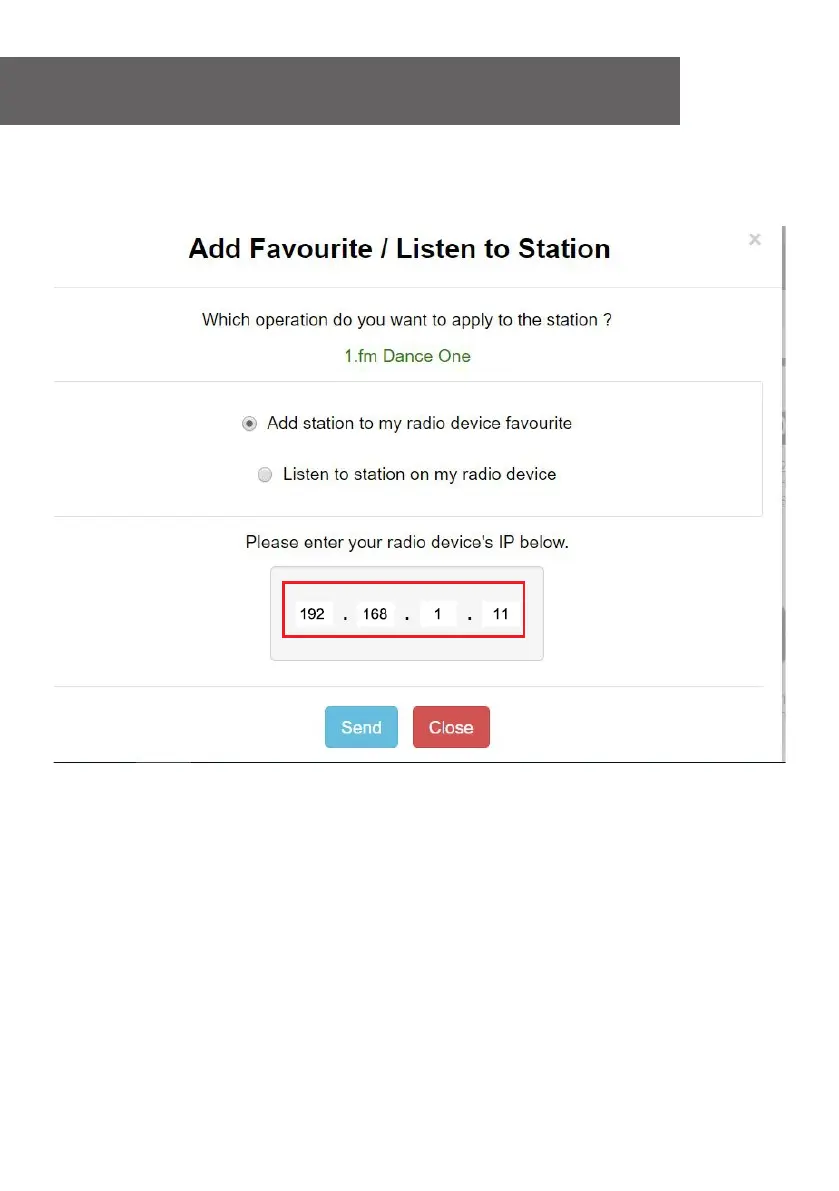
- It will prompt you whether to "Add Favourite" or "Listen to Station". Enter the IP
address of your radio (e.g. 192.168.1.11):
The IP address can be located on the radio unit as follow:
* On the remote control, press the [INFO] button, choose Network and scroll to IP to
view the IP address
* On the radio, return to the Home screen. Navigate to Configuration >
Information > Network Information > IP
- Select "Listen to Station", click "Send" and the radio unit will switch playing the
channel and the "My Favourite" page will pop up on the web browser.
You can then choose to add the playing station to favourite or manage your list by
other edit options. Any changes will synchronize to the radio unit immediately.














 To Next Page