47
To access the Pre Dive Planning Sequence
(while in the Surface mode) -
Press the Left (Advance) button
1 time
Press and release the Right (Select) button to advance
through the Depths/Times, one screen at a time; and then
to Surface Mode.
Press the Left (Advance) button to access Fly Mode.
The unit will revert to Surface Mode after 2 minutes if no
button is pressed.
With each depth displayed by the Pre Dive Planning
Sequence, you will see either predicted no decompression
limits (NDLs) based upon your previous dive profiles (if
calculated to be nitrogen controlled), or predicted oxygen
tolerance limits (OTLs) based upon either a single dive
exposure or your 24 hour accumulation of oxygen (if
calculated to be oxygen controlled).
The Maximum Depth allowed for the PO2 Alarm and FO2
set points will also be displayed.
Depths greater than the maximum depth that can be
achieved with a PO2 of 1.60 ATA will not be displayed.
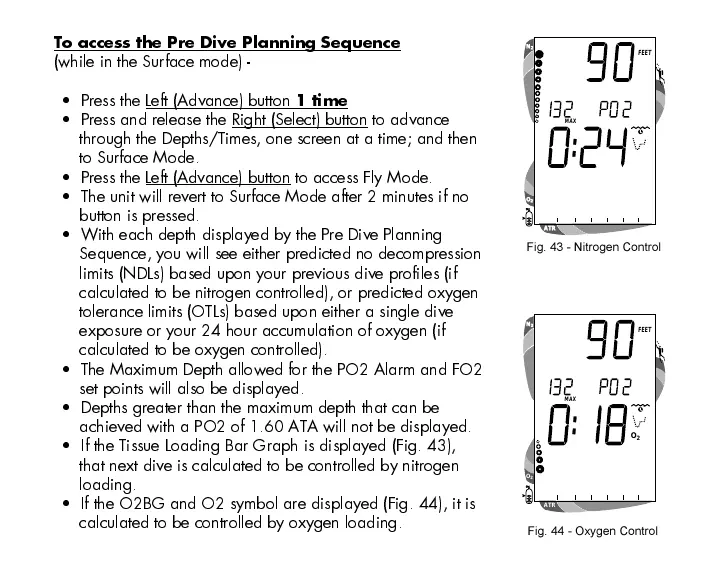
If the Tissue Loading Bar Graph is displayed (Fig. 43),
that next dive is calculated to be controlled by nitrogen
loading.
If the O2BG and O2 symbol are displayed (Fig. 44), it is
calculated to be controlled by oxygen loading.
Fig. 44 - Oxygen Control
Fig. 43 - Nitrogen Control













 To Next Page