77
DEMO
ATR
O
2
N
2
PSI
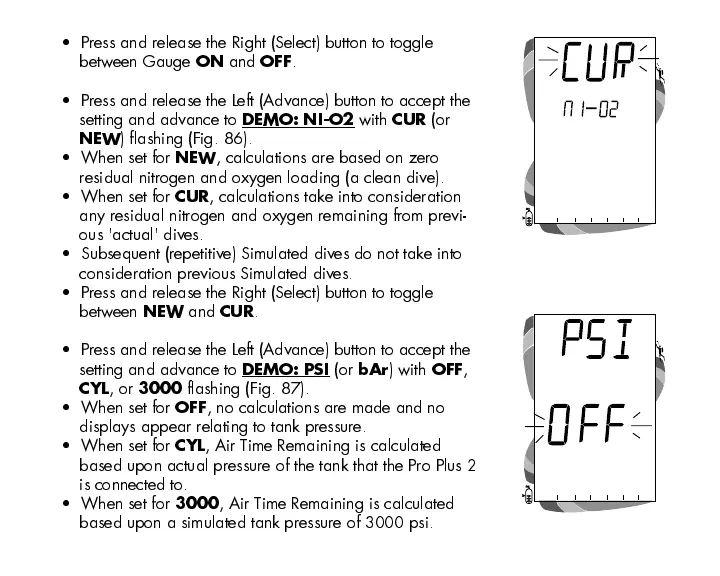
Fig. 86 - Set Demo Calibration
Fig. 87 - Set Pressure On/Off
Press and release the Right (Select) button to toggle
between Gauge
ON
and
OFF
.
Press and release the Left (Advance) button to accept the
setting and advance to
DEMO: NI-O2
with
CUR
(or
NEW
) flashing (Fig. 86).
When set for
NEW
, calculations are based on zero
residual nitrogen and oxygen loading (a clean dive).
When set for
CUR
, calculations take into consideration
any residual nitrogen and oxygen remaining from previ-
ous 'actual' dives.
Subsequent (repetitive) Simulated dives do not take into
consideration previous Simulated dives.
Press and release the Right (Select) button to toggle
between
NEW
and
CUR
.
Press and release the Left (Advance) button to accept the
setting and advance to
DEMO: PSI
(or
bAr
) with
OFF
,
CYL
, or
3000
flashing (Fig. 87).
When set for
OFF
, no calculations are made and no
displays appear relating to tank pressure.
When set for
CYL
, Air Time Remaining is calculated
based upon actual pressure of the tank that the Pro Plus 2
is connected to.
When set for
3000
, Air Time Remaining is calculated
based upon a simulated tank pressure of 3000 psi.













 To Next Page