78
DEMO
PSI
10 20 30 40 50 6005
ATR
O
2
N
2
ATR
O
2
N
2
DEMO
Press and release the Right (Select) button to toggle
between Pressure
ON
and
OFF
.
Press and release the Left (Advance) button to accept the
setting and revert to
Demo Surface Mode
with the
DEMO icon flashing.
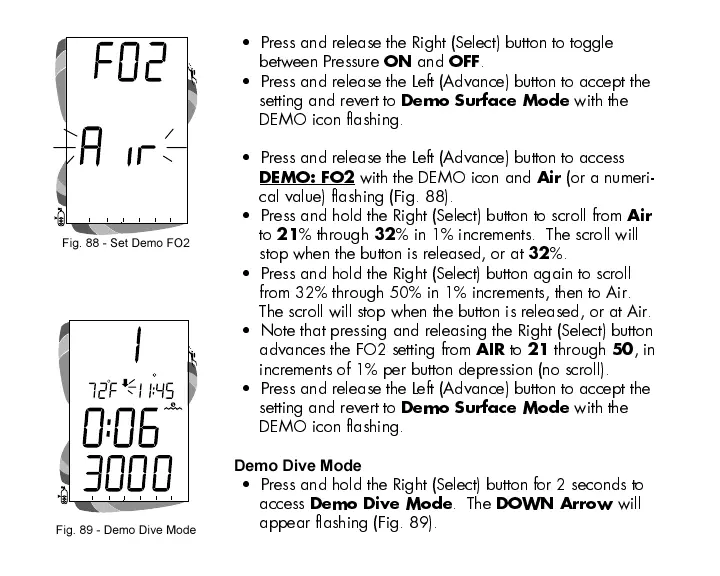
Press and release the Left (Advance) button to access
DEMO: FO2
with the DEMO icon and
Air
(or a numeri-
cal value) flashing (Fig. 88).
Press and hold the Right (Select) button to scroll from
Air
to
21
% through
32
% in 1% increments. The scroll will
stop when the button is released, or at
32
%.
Press and hold the Right (Select) button again to scroll
from 32% through 50% in 1% increments, then to Air.
The scroll will stop when the button is released, or at Air.
Note that pressing and releasing the Right (Select) button
advances the FO2 setting from
AIR
to
21
through
50
, in
increments of 1% per button depression (no scroll).
Press and release the Left (Advance) button to accept the
setting and revert to
Demo Surface Mode
with the
DEMO icon flashing.
Demo Dive Mode
Press and hold the Right (Select) button for 2 seconds to
access
Demo Dive Mode
. The
DOWN Arrow
will
appear flashing (Fig. 89).
Fig. 88 - Set Demo FO2
Fig. 89 - Demo Dive Mode













 To Next Page