69
Pressing and releasing the S button momentarily (< 2 seconds) while viewing a
PREVIEW screen will display that dive s LOG DATA 1 screen (Nitrogen Data).
If that was a Nitrox dive, pressing and releasing the S button again will display that
dive s LOG DATA 2 screen (Oxygen Data). If in GAUGE MODE (Violated or User
Selected), this screen will not be displayed.
LOG screens remain on display until further button action occurs.
Once the S button is pressed, pressing and releasing the A button momentarily (< 2
seconds) button will revert to NORM or GAUG SURF MAIN screen.
Depressing and holding the M button for 2 seconds or if no button is pressed during a
2 minute period operation will revert to the NORM or GAUG SURF MAIN screen.
Pressing the S button will activate the Backlight.
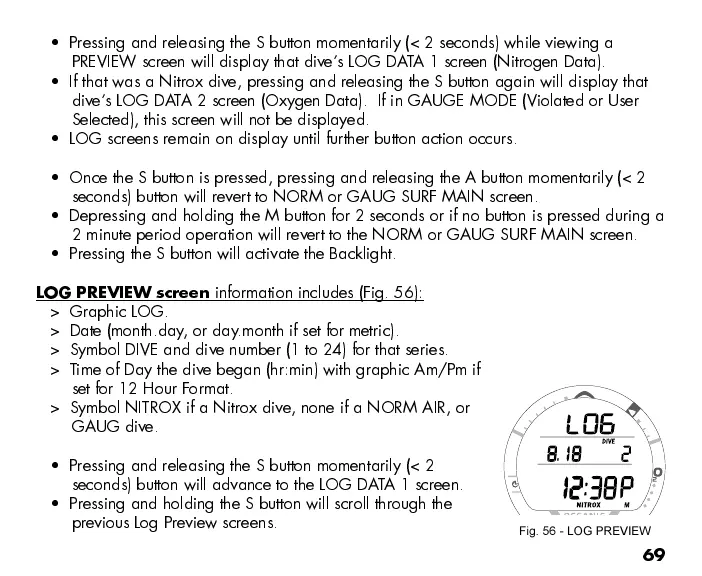
LOG PREVIEW screen
information includes (Fig. 56):
> Graphic LOG.
> Date (month.day, or day.month if set for metric).
> Symbol DIVE and dive number (1 to 24) for that series.
> Time of Day the dive began (hr:min) with graphic Am/Pm if
set for 12 Hour Format.
> Symbol NITROX if a Nitrox dive, none if a NORM AIR, or
GAUG dive.
Pressing and releasing the S button momentarily (< 2
seconds) button will advance to the LOG DATA 1 screen.
Pressing and holding the S button will scroll through the
previous Log Preview screens.
Fig. 56 - LOG PREVIEW


 To Next Page
 Loading...







