78
DEMO
ATR
O
2
M
A
X
• Press and release the Side (Select) button to advance through
the Pressure settings.
• Press and release the Front (Advance) button to accept the
setting and revert to Demo Surface Mode with the DEMO
icon flashing (Fig. 98).
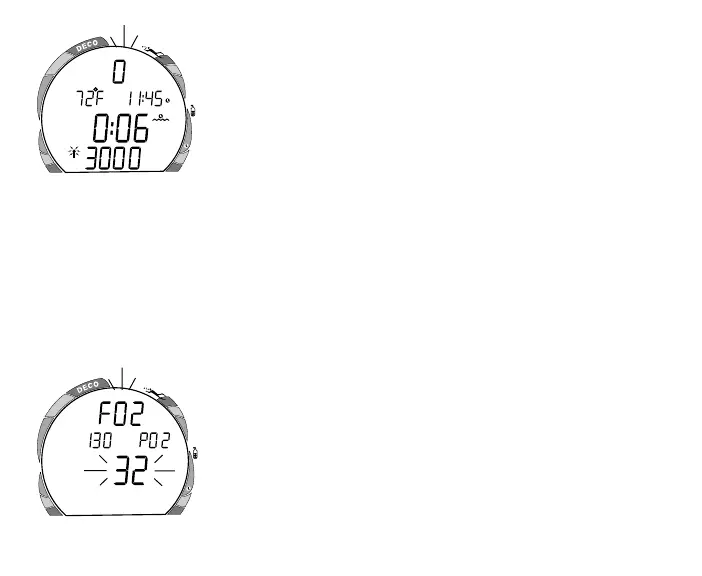
• Press and release the Front (Advance) button to access
DEMO: FO2 with the DEMO icon and Air (or a numerical
value) flashing (Fig. 99). The Maximum Depth allowed for
the PO2 of 1.60 will be displayed with the graphics MAX
and PO2.
• Press and hold the Side (Select) button to scroll from Air to
21% through 32% in 1% increments. The scroll will stop
when the button is released, or at 32%.
• Press and hold the Side (Select) button again to scroll from
32% through 50% in 1% increments, then to Air. The scroll
will stop when the button is released, or at Air.
• Pressing and releasing the Side (Select) button advances the
FO2 setting from AIR to 21 through 50, in increments of 1%
per button depression (no scroll).
• Press and release the Front (Advance) button to accept the
setting and revert to Demo Surface Mode.
Fig. 99 - Set Demo FO2
Fig. 98 - Demo Surface Mode
DEMO
ATR
5
10
20
30
40
50
60
0
PSI
O
2



 To Next Page