80
FEET
DEMO
ATR
5
10
0
PSI
O
2
FEET
DEMO
ATR
5
10
20
0
PSI
O
2
Ascending
Rate of Ascent can be set for 1 or 3 feet per second (fps) prior to
start of the Ascent. To change the Rate during an Ascent, it must
first be stopped.
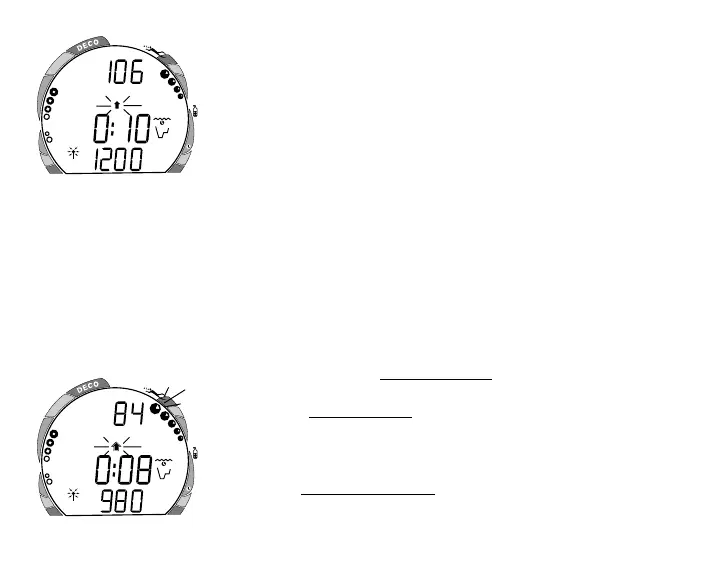
• Pressing and holding the Front (Advance) button for 2 sec-
onds will access an Ascent Rate of 1 feet per second. The
green and yellow segments of the VARI and small UP Arrow
will appear with the Arrow flashing (Fig. 102).
• To set the Rate at 3 feet per second (Too Fast), press and hold
the Front (Advance) button for 2 seconds. The red segment of
the VARI and an outer UP Arrow around the small one will
appear flashing (Fig. 103). The Alarm will sound and the red
LED will flash.
• Pressing and holding the Front (Advance) button for 2 sec-
onds will return the Rate to 1 feet per second.
• Tap (press/release) the Front (Advance) button while the
Arrow is flashing to begin an Ascent at the Rate set.
• Tap (press/release) the Front (Advance) button during the
Ascent to stop the Ascent.
• Tap (press/release) the Front (Advance) button while the
Ascent is stopped to access Alternate displays.
• Press/hold the button for 2 seconds while the Ascent is
stopped to restart the Ascent.
Fig. 103 - Ascent set at 3 fps
Fig. 102 - Ascent set at 1 fps



 To Next Page