ODYS Multi Pocket TV 430
7
EN
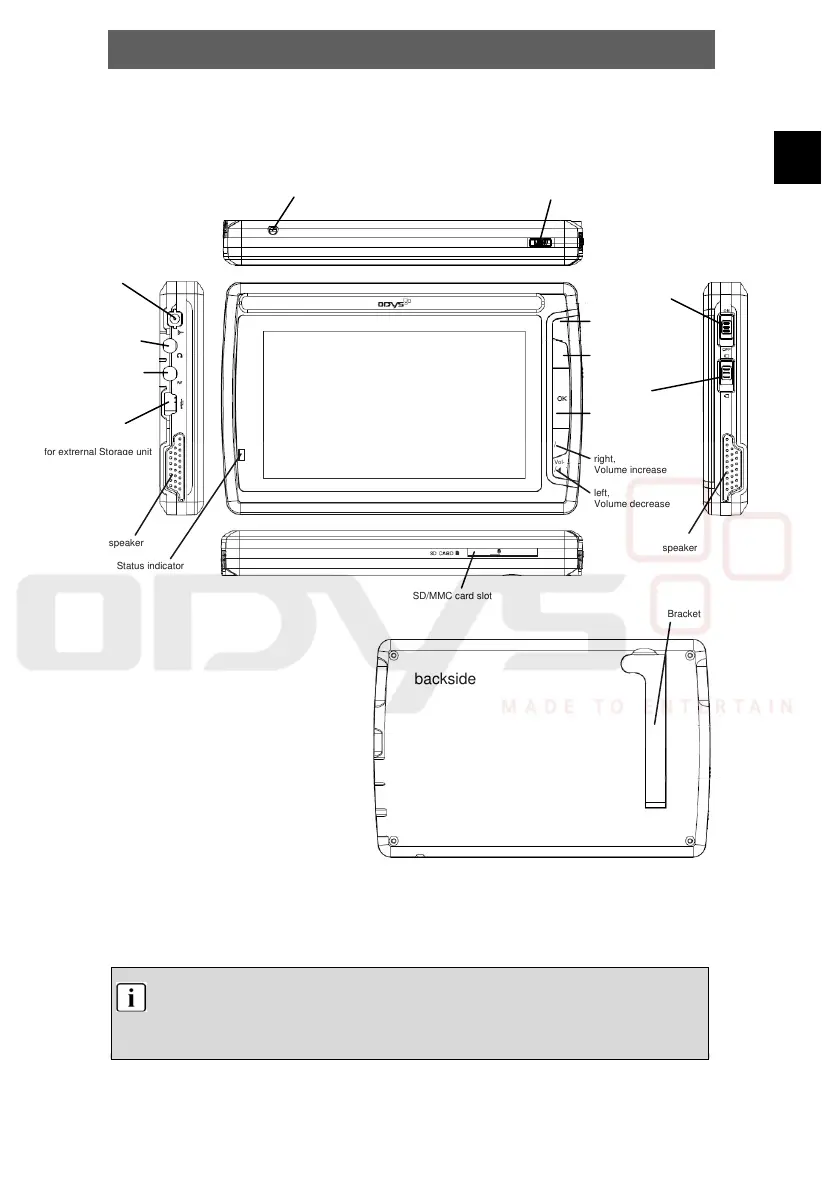
4 Controls
4.1 Buttons on the main unit
4.2 Keylock
You can block all buttons to prevent accidental operation. To do so, simply move the
key lock switch upwards (HOLD). During operation, "Hold" is shown in the LCD
display. Unlock the keys by moving the switch back.
Note
Charge the battery with the device switched off. This will shorten the charging time
and extend the life of the battery.
Charge the battery fully before using for the first time.
additional Antenna
connection jack
Bracket
Rückseite
Main Menu, return
backside
Power on/off switch
Interne Antenna
up,
next Station/Titel
down,
last station/Titel
keylock
select, confirm,
sort-key menu
in DVB-T Mode
right,
Volume increase
left,
Volume decrease
SD/MMC card slot
Power supply connection
and USB Host interface
for extrernal Storage unit
A/V out
ut
ack
Status indicator
speaker
speaker
CH+
Vol+
Vol-
CH-
/



 To Next Page