5
TABLE OF CONTENTS (Cont.)
4.6 Clear Tare Operation ......................................................................................................................................... 22
4.7 Unit Switch Operation ....................................................................................................................................... 22
4.8 Parts Counting Operation .................................................................................................................................. 23
4.9 Establishing a New Average Piece Weight ........................................................................................................ 23
4.10 Returning to a Weighing Mode ........................................................................................................................ 24
4.11 Returning to a Preset APW ............................................................................................................................. 24
4.12 RS232 Commands .......................................................................................................................................... 25
4.12.1 Output Formats ..................................................................................................................................... 25
4.13 Printing Data ................................................................................................................................................... 25
5. CARE AND MAINTENANCE ............................................................................................................................ 26
5.1 Troubleshooting ................................................................................................................................................. 26
5.2 Error Codes List ................................................................................................................................................ 27
5.3 Service Information........................................................................................................................................... 27
5.4 Replacement Parts ........................................................................................................................................... 27
5.5 Accessories ..................................................................................................................................................... 27
5.6 Technical Data .................................................................................................................................................. 27
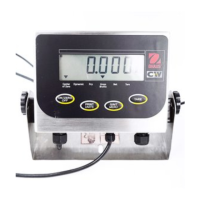
CD-11 Indicator
6
OVERVIEW OF CONTROLS AND INDICATOR FUNCTIONS
No. Designation Function
1 Display LCD display, indicates weight, modes and setup information.
2 Stable LCD indicator prompt, indicates that the measured value has become stable.
3 Center of Zero LCD indicator prompt, indicates center of zero.
4 ON/OFF button When pressed, turns Indicator on or off.
5 Pcs LCD indicator prompt, indicates parts counting function.
6 Print/Units button Short press, prints data which is displayed on the Indicator.
Long press, changes unit of measure.
7 Gross Brutto LCD indicator prompt, indicates gross weight.
8 Zero/Menu button When pressed, zero's display. Long press allows entry into menus.
9 Net LCD indicator prompt indicates net weight.
10 G/N/T button Repeated presses, select either gross, net or tare weight to be displayed.
Tare Long press enters tare value into memory.
11 Tare LCD indicator prompt indicates tare function.
12 kg LCD indicator, when lit, indicates weight in kilograms.
g LCD indicator, when lit, indicates weight in grams.
13 -lb LCD indicator, when lit, indicates weight in pounds.
3
4
2
5
6
8
9
10
7
1
12
13
11
CD-11 Indicator


 To Next Page