C5800 Ldn User’s Guide
Lists of Available Settings by Menu • 96
Usage Menu
This menu is for information only. It provides an indication of
total usage of the printer and the expected life left in its
consumable items. This is particularly useful if you do not have
a full set of replacement consumables on hand and you need
to know how soon you will need them.
• Items with a dagger (†) only appear when the
appropriate option is installed.
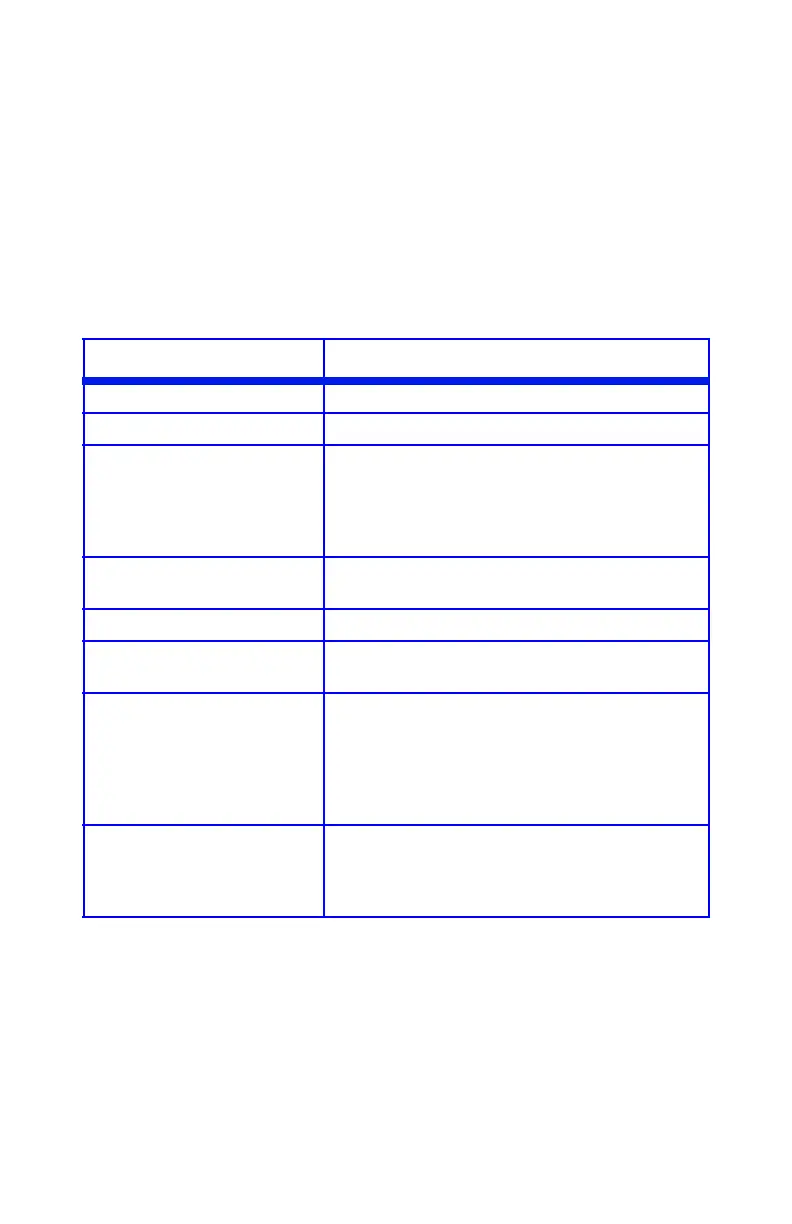
Item Explanation
TOTAL PAGE COUNT The total number of pages printed.
TRAY1 PAGE COUNT The total number of pages fed from Tray 1.
TRAY2 PAGE COUNT† The total number of pages fed from optional
Tray 2.
Appears only if the optional Second Paper Tray
is installed. See “Second Paper Tray”, on
page 103.
MPT PAGE COUNT The total number of pages fed from the
Multi-Purpose Tray.
COLOR PAGE COUNT The total number of pages printed in color.
MONO PAGE COUNT The total number of pages printed in
monochrome.
K DRUM LIFE
C DRUM LIFE
M DRUM LIFE
Y DRUM LIFE
BELT LIFE
FUSER LIFE
Percentage of life remaining in these
consumable items is indicated as nn%.
K TONER
C TONER
M TONER
Y TONER
Current remaining toner is indicated as nn%.
2k= standard cartridge
5K= high-capacity cartridge





 To Next Page