EN
FR
DE
ES
PT
EL
PL
NL
IT
SV
HU
WAARSCHUWINGEN WIRELESS Bi2 KIT
ΠΡΟΕΙΔΟΠΟΙΗΣΕΙΣ Bi2 ΑΣΥΡΜΑΤΟ KIT
AVISOS DO KIT WIRELESS BI2
CONSIGNES KIT SANS FIL Bi2
WIRELESS KIT Bi2 WARNINGS
AVVERTENZE KIT WIRELESS Bi2
VARNINGAR FÖR TRÅDLÖST SATS Bi2
OSTRZEŻENIA DOTYCZĄCE ZESTAWU BEZPRZE WODOWEGO Bi2
ADVERTENCIAS DEL KIT WIRELESS Bi2
HINWEISE FÜR DAS KABELLOSE ÜBERTRAGUNGS-SET Bi2
FIGYELMEZTETÉSEK A VEZETÉK NÉLKÜLI Bi2 KÉSZLETHEZ
KIT WIRELESS Bi2
B1130
EN
FR
DE
ES
PT
EL
PL
NL
IT
SV
HU
WAARSCHUWINGEN WIRELESS Bi2 KIT
ΠΡΟΕΙΔΟΠΟΙΗΣΕΙΣ Bi2 ΑΣΥΡΜΑΤΟ KIT
AVISOS DO KIT WIRELESS BI2
CONSIGNES KIT SANS FIL Bi2
WIRELESS KIT Bi2 WARNINGS
AVVERTENZE KIT WIRELESS Bi2
VARNINGAR FÖR TRÅDLÖST SATS Bi2
OSTRZEŻENIA DOTYCZĄCE ZESTAWU BEZPRZE WODOWEGO Bi2
ADVERTENCIAS DEL KIT WIRELESS Bi2
HINWEISE FÜR DAS KABELLOSE ÜBERTRAGUNGS-SET Bi2
FIGYELMEZTETÉSEK A VEZETÉK NÉLKÜLI Bi2 KÉSZLETHEZ
KIT WIRELESS Bi2
B1130
1
C
B
A
A
A
B1
B1
B
B
EN - 4
ENGLISH
2.2 - COMPATIBILITY
Before proceeding with the installation of the kit B1130, check the serial number of the
terminal.Ifthefthsymboloftheserialnumberisaletter present in the list below, the
printed circuit board is not compatible and it’ll be necessary to contact the assistance
service for the installation.
Thefthsymbolmustnotbe:
“ A - B - C - D - E - F - G - H - I - L - M - N - P - R - S - U - V - X - Z ”.
3 - DESCRIPTION OF THE KIT
3.1 - CONTENT OF THE KIT
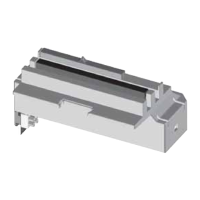
A. Board
B. Cable
C. Warnings manual
3.2 - KIT ASSEMBLY (FIG.1)
• Connect the connector (A) to the terminal (B1) of the kit cable (B).
• Make sure that a “Click” is heard during the connection for the correct linking of the
two terminals.



 To Next Page
 Loading...