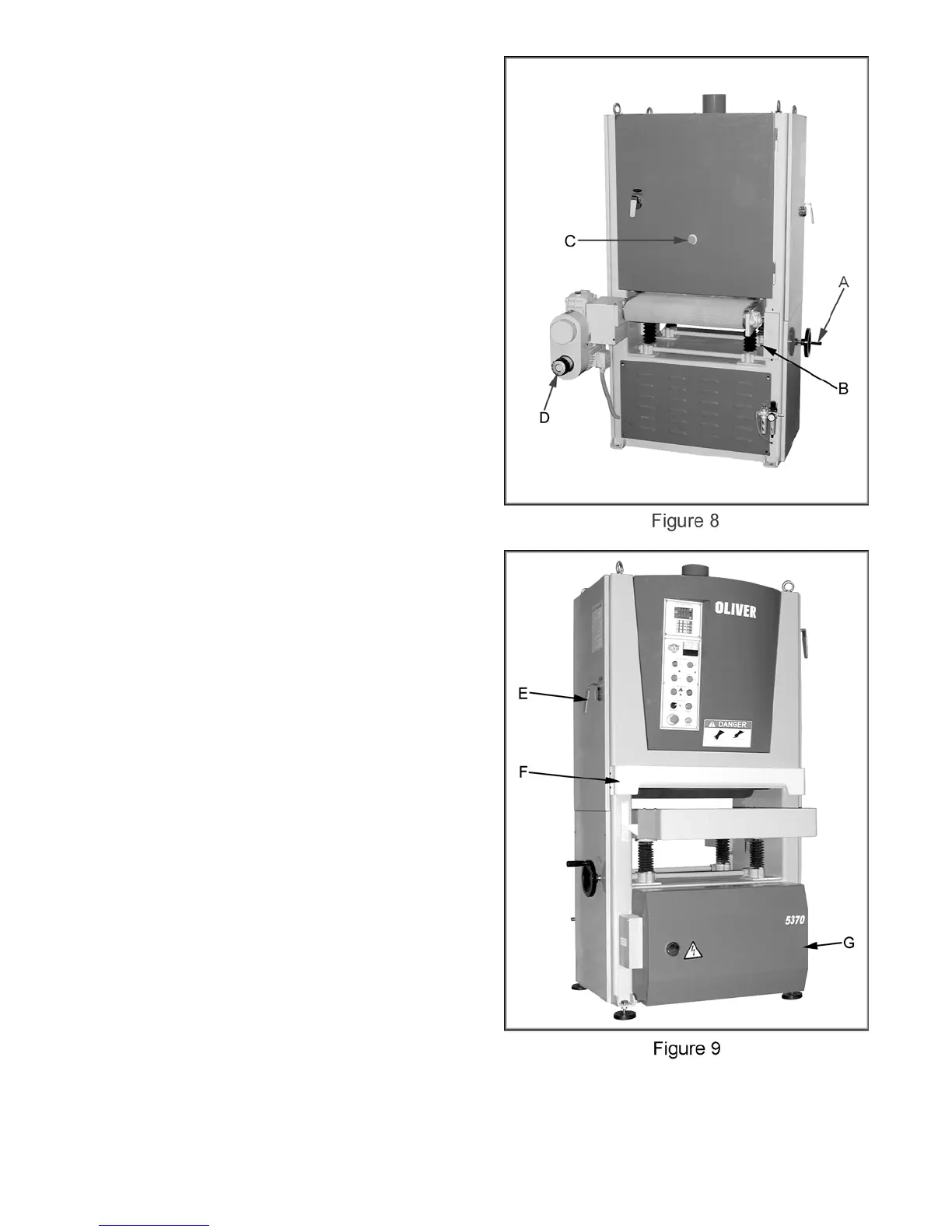
Features and Controls
A. Table Height Adjustment Handwheel:
The handwheel can be used to raise and
lower the conveyor table.
B. Table Limit Switch: There is a lower and
upper limit switch to stop the conveyor table
from lowering and raising while using the
automatic controls. If these switches are
triggered you will need to use the manual
handwheel to move the conveyor past the
switch before the automatic controls can be
used again.
C. Emergency Stop: Stops all functions of
machine, but the sander still has power. To
reset rotate the switch clockwise until button
pops out.
D. Feed Rate Adjustment Knob: Rotate knob
to adjust conveyor feed rate between 16-49
feet per minute. Important: only change
feed rate while the conveyor is moving!
E. Door Handle: Rotate handle to latch the
door. Pull the handle straight up to remove
and insert into any of the hubs found on the
doors.
F. Thickness Limit Safety Switch: The limit
switch is behind the guard and will “trip”
cutting power to the machine if the material
being fed through the machine is too thick.
G. Electrical Box: This houses the main
electronics of the sander. There is an
On/Off breaker inside the cabinet that must
be in the “ON” position to operate the
machine.
9



 To Next Page