d-Color MF651/551 11-23
11.5 Administrator Mode Overview
11
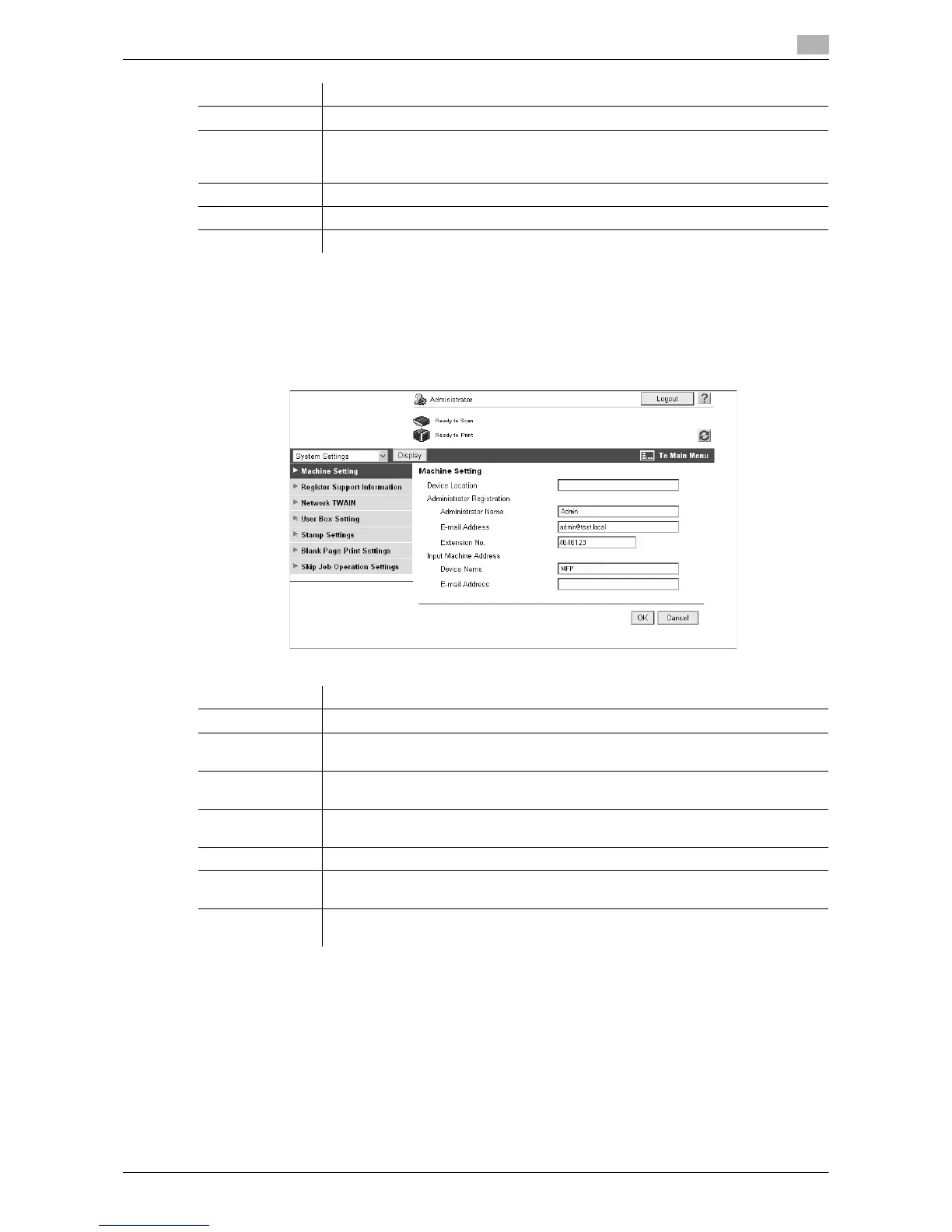
11.5.2 System Settings
Reference
- To use the machine as a scanner from an application using TWAIN, install the "TWAIN" driver software
designed for that purpose. For details, refer to the TWAIN driver manual in the DVD supplied together.
Timer Setting Configure Power Save or Weekly Timer Setting in this machine.
Network Error
Code Display
Setting
Specify whether to display the network error code.
Reset Clears all settings for the network, controller and destinations.
License Settings Allows you to issue a license and enable functions. Also, issues a request code.
Edit Font/Macro Adds font or macro.
Item Description
Item Description
Machine Setting Changes the registration information of this machine.
Register Support
Information
Configure online assistance of this machine. To display this information, select "In-
formation" - "Online Assistance".
Network TWAIN Specify the time to automatically release the operation lock when scanning (exclud-
ing push-scanning).
User Box Setting Configure the User Box functions such as deleting an unnecessary User Box or
specifying the document deletion time.
Stamp Settings Register a header or footer.
Blank Page Print
Settings
Allows you to configure whether to print the contents specified in "Stamp/Compo-
sition" on blank pages.
Skip Job Opera-
tion Settings
Specify whether to skip a job.





 To Next Page