OFX 9700
- 43 -
11 - PC Features
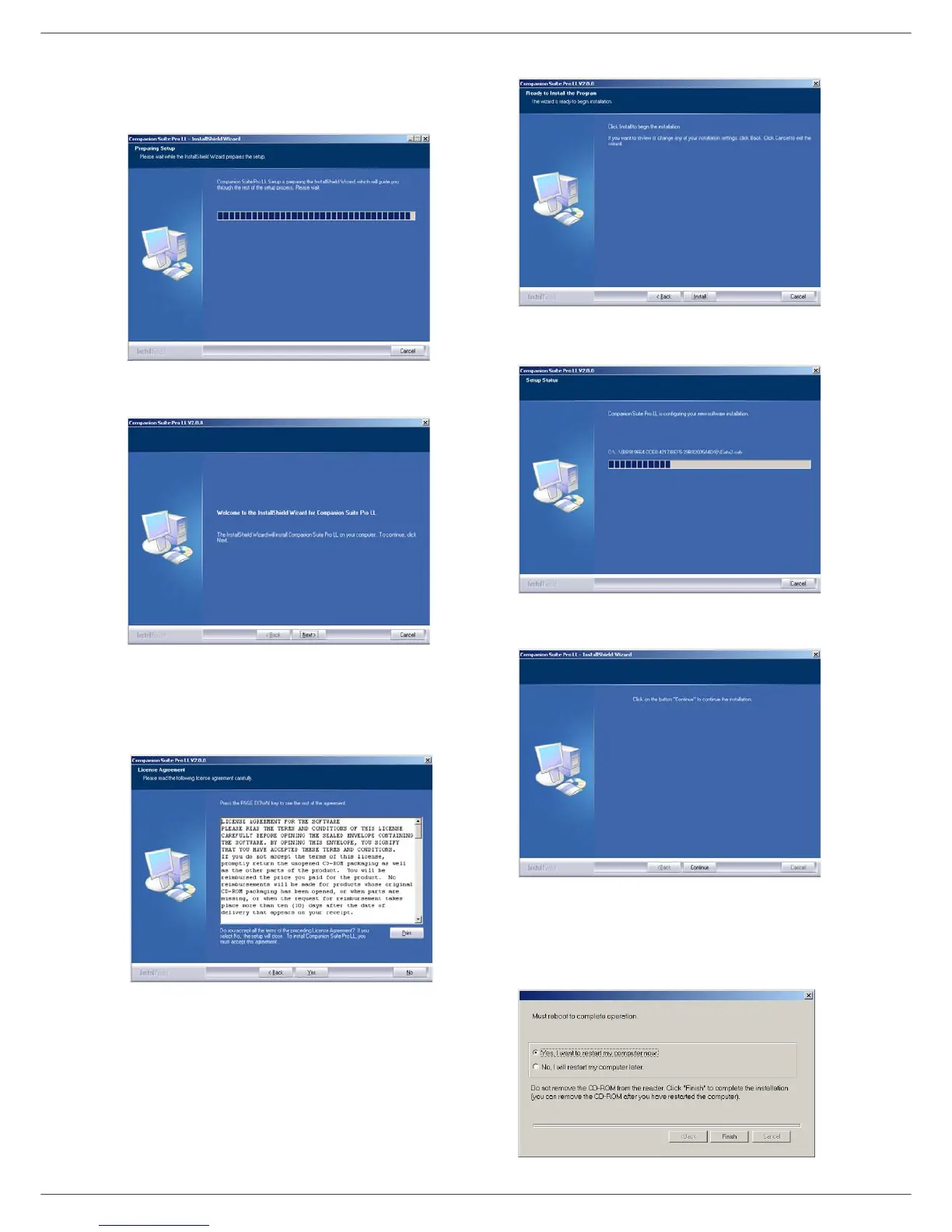
6 After restart, the InstallShield Wizard screen shows
the progress of the assistant preparation.
You can stop the procedure at any time by clicking
on the C
ANCEL button.
7 When the assistant finishes, the welcome screen
appears.
8 Click on the N
EXT button to launch the installation
of the C
OMPANION SUITE PRO kit on your PC.
9 Before the files are copied on your hard drive, you
need to accept the proposed license agreement,
use the scroll bar to read the agreement entirely.
10 Click on the Y
ES button.
11 Click on the N
EXT button.
12 The final installation is ready to be executed.
13 Click on the I
NSTALL button.
14 A screen informs you of the installation progress.
15 The Companion Suite Pro software is installed on
your PC.
16 Click on the C
ONTINUE button to copy the utilities
and PaperPort SE software that come along with
the kit.
17 At the end of the installation, you need to restart
your PC to update the system files.













 To Next Page