30
Preventing Accidental Erasure (Protection)
It is recommended that you protect
important images to avoid accidentally
erasing them. When an image is
protected, it cannot be erased.
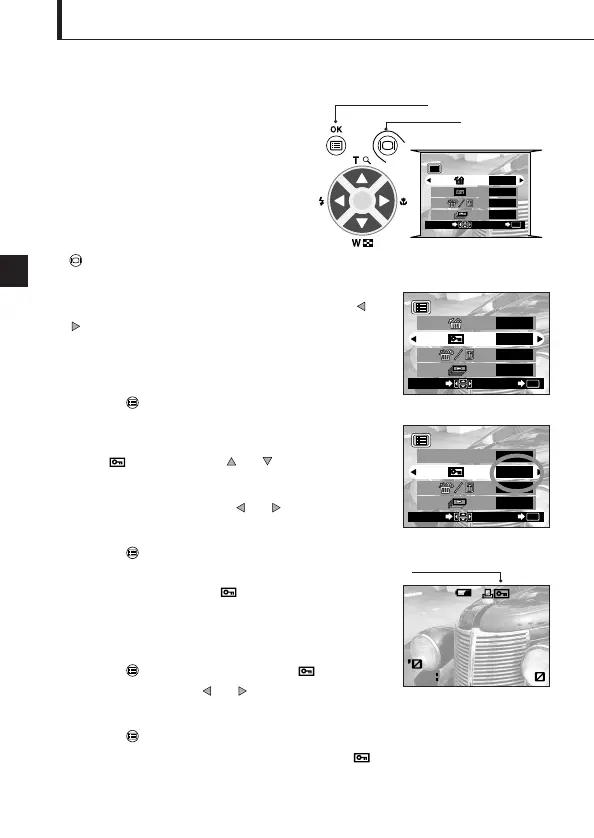
Playback mode menu 1/3 screen
Operating Procedure
1. Check that the camera is set to the
Playback mode by holding down the
monitor button for a moment.
2. Select the image frame to protect by pressing the or
arrow pad key.
(The frame can also be selected even in the 4-frame or
9-frame display mode.)
3. Press the OK/menu button.
The monitor shows the playback mode menu 1/3.
4. Select by pressing the or arrow pad key.
5. Select “ON” by pressing the or arrow pad key.
6. Press the OK/menu button.
The selected image frame is protected (image locked)
and the protect indicator is displayed at the top
right of the image.
Unprotecting an image:
7. Press the OK/menu button to selectt . Select
“OFF” by pressing the or arrow pad key.
8. Press the OK/menu button.
Protection is canceled and the protect indicator ( )
disappears.
Arrow pad
OK/menu button
Playback mode menu 1/3 screen












 To Next Page