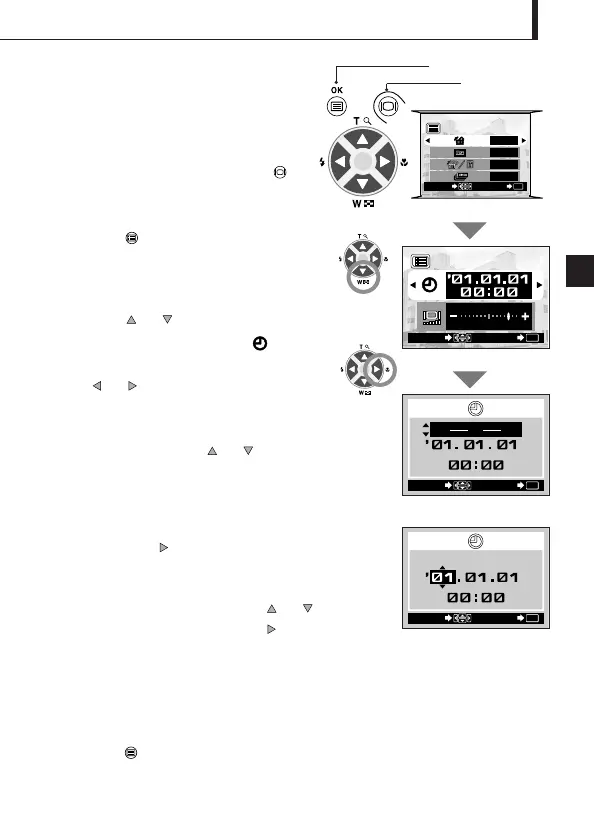
Date/time setup screen
Setting the Date and
Time
Operating Procedure
1. Check that the camera is set to the
Playback mode by holding down the
monitor button for a moment.
2. Press the OK/menu button.
The playback mode menu 1/3 is displayed on
the monitor.
3. Press the or arrow pad key to
display the menu 3/3 and select .
4. Display the “Y—M—D” menu by pressing
the or arrow pad key.
5. Select one of the following date/time display
formats by pressing the or arrow pad
key.
Y—M—D (Year·Month·Day)
M—D—Y (Month·Day·Year)
D—M—Y (Day·Month·Year)
Then press the arrow pad key.
The cursor moves to the figure setting field.
6. Set the first figure by pressing the or
arrow pad key, and then press the arrow
pad key.
The cursor moves to the next figure.
7. Repeat the above steps to set the hour and
minutes.
8. When the actual time reaches zero seconds,
press the OK/menu button.
The date and time are set and the screen
returns to the playback mode menu 3/3.
Arrow pad
OK/menu button
Playback mode menu 1/3 screen





 To Next Page