6
Troubleshooting
101
EN
Troubleshooting
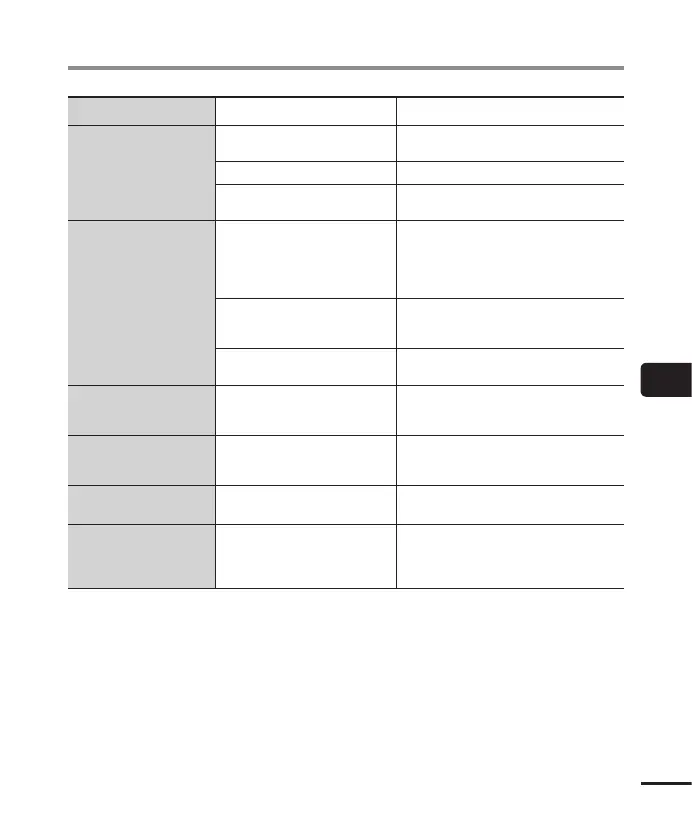
Problem Possible cause Solution
Unable to write index
marks/temp marks
The maximum number of marks
(99) has been reached.
Erase unneeded marks (☞ P. 45).
The file is locked.
Unlock the file (☞ P. 52).
The file is a read-only file.
Unlock the file, or undo the read-only
setting on a PC.
Unable to charge the
battery
[Alkaline] has been selected for
[Battery].
To use the rechargeable battery provided,
select [Ni-MH] for [Battery]. Do not use
the rechargeable battery at higher/lower
temperatures than the recommended
range (☞ P. 10, P. 15, P. 67).
The `OK button was not pressed.
Press the `OK button as directed in
the confirmation screen shown when
connecting the USB connector.
[Composite] has been selected
for [USB Class].
Select [Storage Class] for [USB Class]
(☞ P. 86).
The PC is unable to
recognize the voice
recorder.
[AC Adapter] has been selected
for [USB Connection].
Select [PC] for [USB Connection]
(☞ P. 86).
Button operations are
abnormal.
[Transcription] or [Language
study] has been selected for
[Play Scene].
Select [Off] for [Play Scene] (☞ P. 39).
Playback speed is fast
(or slow).
Playback speed function is set to
anything other than [x1.0 Play].
Set the playback speed function setting to
[x1.0 Play] (☞ P. 41).
Operation is different
from usual.
The settings of functions have
been changed.
Try [Reset settings]. Various functions will
be restored to their initial (factory default)
settings. Time clock settings and recorded
files are retained (☞ P. 69).



 To Next Page