4
Recording menu [Rec Menu]
59
EN
Recording menu [Rec Menu]
TIP
• The voice recorder automatically ends
recording and returns to recording
standby mode when the input sound
has been below the voice sync level
for at least the set detection time.
Each time the voice recorder enters
standby mode, the current file is closed.
Recording continues in a new file the
next time sound is detected.
• Press the STOP ( 4) button to end a
voice sync recording session.
NOTE
• The following function is disabled
when using the [V-Sync. Rec] function:
• [VCVA] (☞ P. 57)
• [With recording] (☞ P. 71)
Setting timer recording
[Timer Rec]
Recording starts automatically when the set
time arrives.
See “Setting timer recording [Timer Rec]”
(☞P. 80) for the procedure.
2
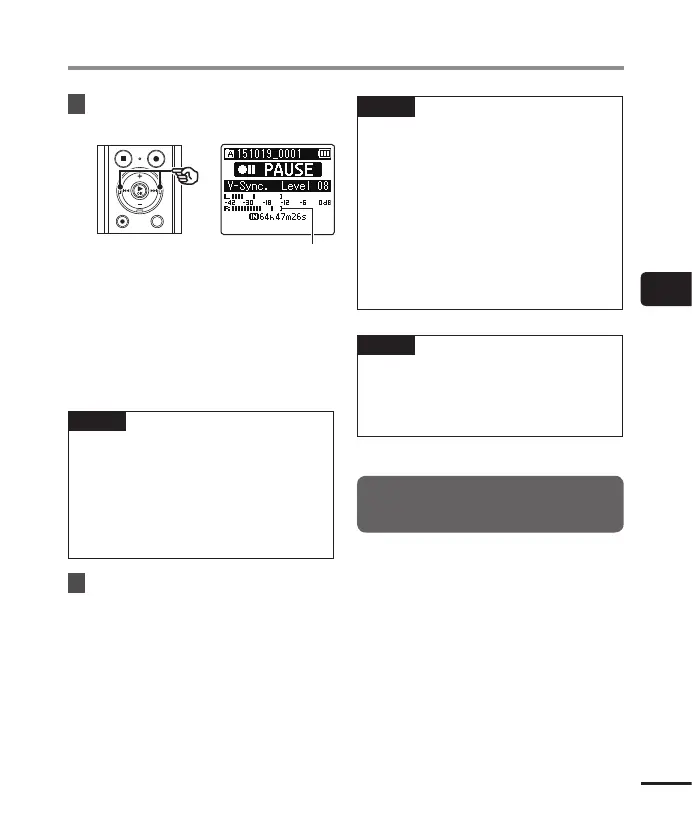
Press the 9 or 0
button to
adjust the voice sync level.
Voice sync level (moves left/right to
match set level)
• The voice synch level can be adjusted
to a setting between [01] and [23].
• Increasing the setting number increases
the activation sensitivity, enabling
quieter sounds to activate the start of
recording.
TIP
• To change the recording level
(☞P.54) during voice sync level
adjustment in [Manual], press the F1
button. The voice recorder changes to
recording level adjustment mode. Press
the F1 button again to return to voice
sync level adjustment mode.
3
Press the
REC
( s) button again.
• The blinking message [Standby]
appears in the display, and the LED
indicator light flashes.
• Recording starts automatically if the
input is louder than the voice sync
level.



 To Next Page