2
Selecting the automatic recording setting [Rec Scene]
30
EN
Selecting the automatic recording setting [Rec Scene]
4
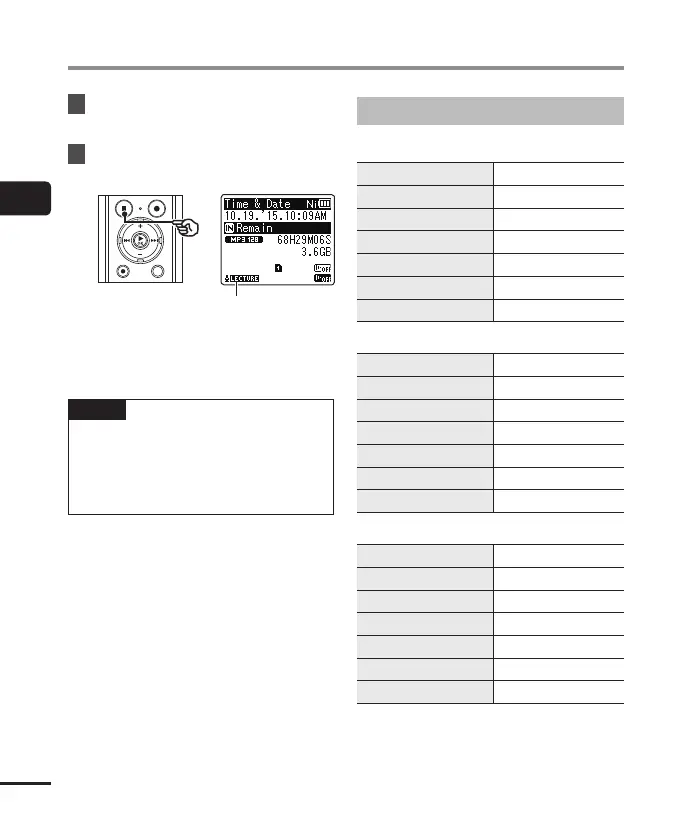
Press the `
OK
button to finalize
the setting.
5
Press the
STOP
( 4) button to exit
the selection screen.
Rec Scene
• Press and hold the STOP ( 4) button
when the recorder is stopped to check
setting indicators meanings.
NOTE
• Recording menu settings cannot be
changed when a [Rec Scene] selection
has been made. To use these functions,
you must select [Off] for the [Rec
Scene] setting.
Preregistered [Rec Scene] settings
[
Lecture
]
[
Rec Level
] [
High
]
[
Rec Mode
] [
MP3 128 kbps
]
[
Zoom Mic
] [
+6
]
[
Low Cut Filter
] [
On
]
[
Mic Select
] [
Central Mic Off
]
[
VCVA
] [
Off
]
[
V-Sync. Rec
] [
Off
]
[
Conference
]
[
Rec Level
] [
Auto
]
[
Rec Mode
] [
MP3 128 kbps
]
[
Zoom Mic
] [
Off
]
[
Low Cut Filter
] [
On
]
[
Mic Select
] [
Central Mic Off
]
[
VCVA
] [
Off
]
[
V-Sync. Rec
] [
Off
]
[
Meeting
]
[
Rec Level
] [
Middle
]
[
Rec Mode
] [
MP3 128 kbps
]
[
Zoom Mic
] [
Off
]
[
Low Cut Filter
] [
Off
]
[
Mic Select
] [
Central Mic Off
]
[
VCVA
] [
Off
]
[
V-Sync. Rec
] [
Off
]



 To Next Page