201
EN
t;:p=t
V:,·,~\;,=
;.;<-)~i-IEJ
--
-_Yf{~:/-t>'
~~-
''
Us
.ing
..
li
.
"e
..
..
.
g.
uldes
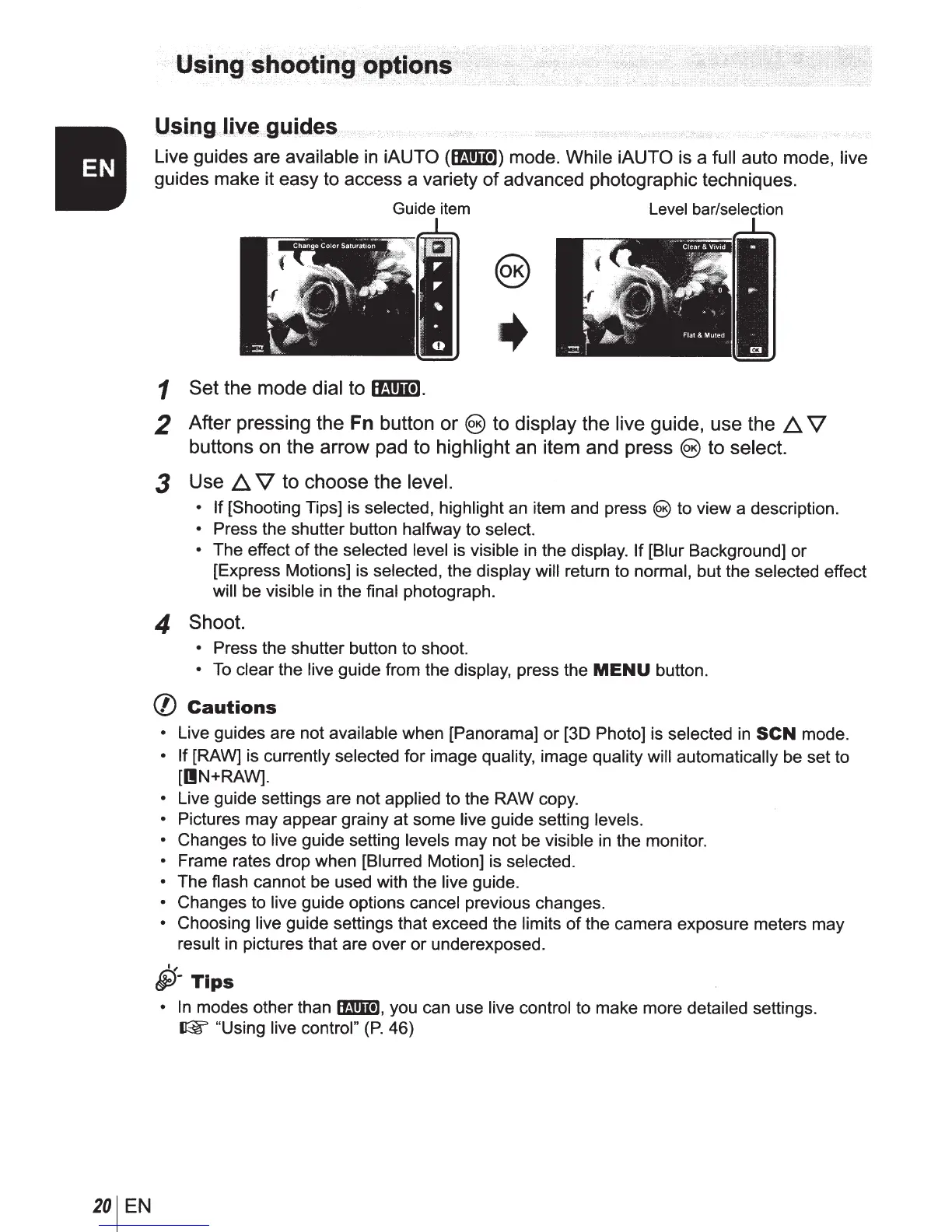
Live guides are available
in
iAUTO
(lmlm)
mode.
While iAUTO
is a
full
auto mode,
live
guides make it easy to access a variety
of
advanced photographic techniques.
Guide
item
Level
bar/selection
+
1 Set
the mode dial to
mt!llil.
2
After pressing the
Fn
button
or@)
to display the live guide, use the
6,.
V
buttons on the arrow pad to highlight an item and press
@)
to select.
3
Use
6..
V
to choose the level.
• If
[Shooting Tips) is selected, highlight an item and press
@)to
view a description.
•
Press the shutter button halfway to select.
• The effect
of
the selected
level is visible
in
the display.
If
(Blur Background] or
[Express Motions] is selected, the display will
return to normal, but the selected effect
will
be visible
in
the final photograph.
4
Shoot.
•
Press the shutter button to shoot.
•
To
clear the
live
guide from the display, press the
MENU
button.
(f)
Cautions
•
Live guides are not available when [Panorama] or
(30
Photo]
is
selected
in
SCN
mode.
• If [RAW] is currently
selected for image quality, image quality
will automatically
be set to
[IIN+RAW].
•
Live guide settings are not applied to the RAW copy.
•
Pictures may appear grainy at some
live
guide setting levels.
•
Changes to live
guide setting
levels
may not be visible
in
the monitor.
•
Frame rates drop when [Blurred Motion] is selected.
•
The flash cannot be used with the
live
guide.
•
Changes to live
guide options cancel previous changes.
•
Choosing
live guide settings that
exceed the limits
of
the camera exposure meters may
result
in
pictures that are over or underexposed.
I,
5)-
Tips
•
In
modes other than
IB!m],
you can use
live control to make more detailed settings.
~"Using
live control"
(P.
46)



 To Next Page