1-49
OEP-3 V1 (UC)
96
Installation and Adjustment
Setting Up the Printer (Continued)
COLOR ADJUST COLOR : 200
/ COL / LAY / PRN / IN / OUT /
LOAD COLOR : 1 / 2 / 3 TEMP
: 1 / 2 / 3 [EXEC]
MAG – GRN : 0
YEL – BLU : 0
DARK
LIGHT
SHARPNESS
INTERPOL.
SAVE COLOR
CYN – RED : 0
Q1 A 1
S
: 0
: 0
: 8
: OFF / ON
L
IGHT : 0
D
ARK : 0
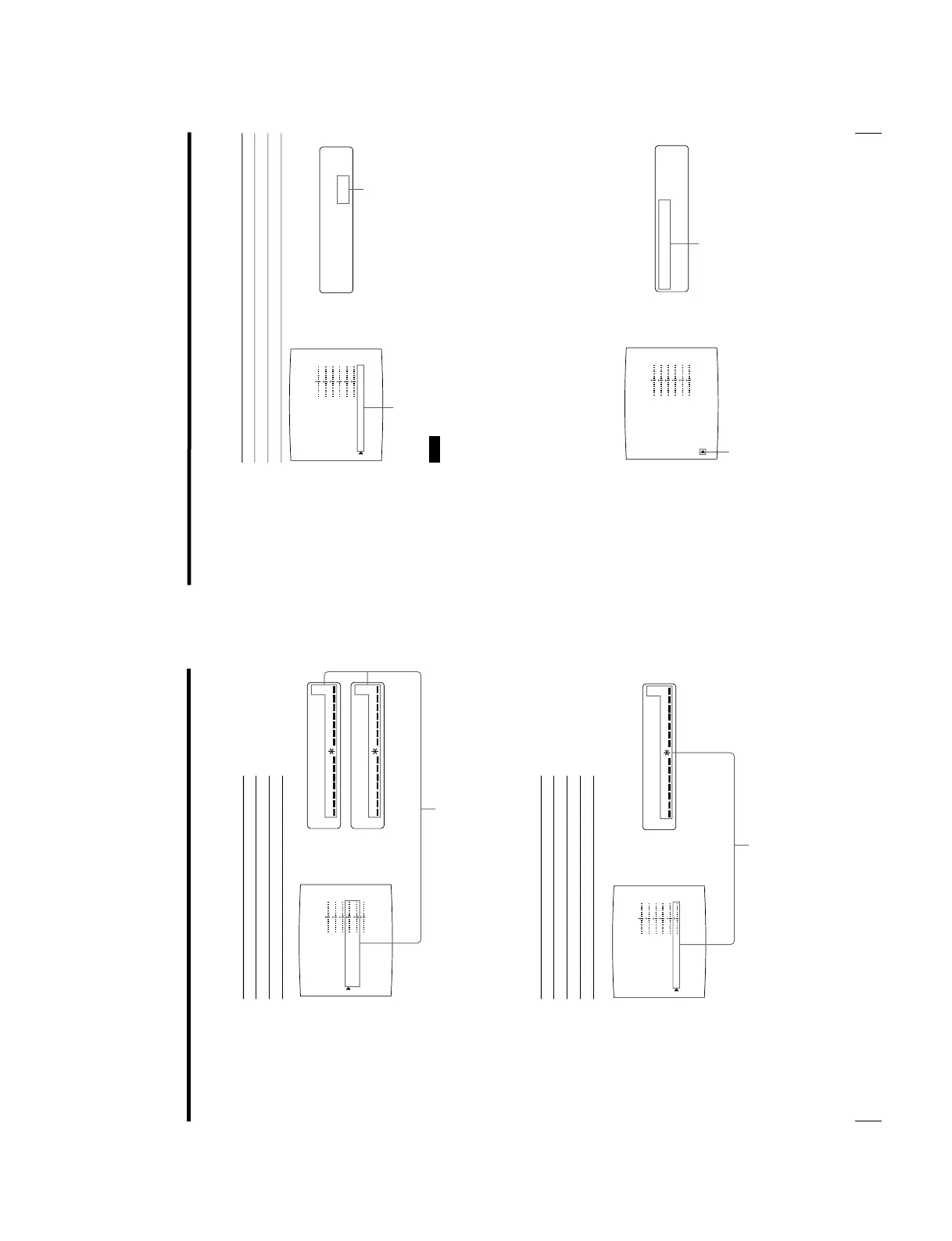
When adjusting DARK/LIGHT (contrast)
Adjustment item When you want to
DARK Adjust the dark area of an image.
LIGHT Adjust the light area of an image.
When adjusting the sharpness
SHARPNESS
You can set the sharpness to any of 15 steps from 1 to 15. A setting of step 8
corresponds to the standard sharpness (default setting).
When you want to Content of settings
Make a soft outline. To the left (toward step 1)
Make a normal outline. Centered (step 8)
Make a sharp outline. To the right (toward step 15)
The contrast in the dark area or light area is increased in the + direction
by pressing the g button.
The contrast in the dark area or light area is weakened in the
– direction
by pressing the G button.
The number and the corresponding sharpness increase every
time you press the g button.
The number and the corresponding sharpness decrease
every time you press the G button.
COLOR ADJUST COLOR : 200
/ COL / LAY / PRN / IN / OUT /
LOAD COLOR : 1 / 2 / 3 TEMP
: 1 / 2 / 3 [EXEC]
MAG – GRN : 0
YEL – BLU : 0
DARK
LIGHT
SHARPNESS
INTERPOL.
SAVE COLOR
CYN – RED : 0
Q1 A 1
S
: 0
: 0
: 8
: OFF / ON
S
HARPNESS : 8
97
Installation and Adjustment
COLOR ADJUST COLOR : 200
/ COL / LAY / PRN / IN / OUT /
LOAD COLOR : 1 / 2 / 3 TEMP
: 1 / 2 / 3 [EXEC]
MAG – GRN : 0
YEL – BLU : 0
DARK
LIGHT
SHARPNESS
INTERPOL.
SAVE COLOR
CYN – RED : 0
Q1 A 1
S
: 0
: 0
: 8
: OFF / ON
I
NTERPOL :
OFF / on
COLOR ADJUST COLOR : 200
/ COL / LAY / PRN / IN / OUT /
LOAD COLOR : 1 / 2 / 3 TEMP
: 1 / 2 / 3 [EXEC]
MAG – GRN : 0
YEL – BLU : 0
DARK
LIGHT
SHARPNESS
INTERPOL.
SAVE COLOR
CYN – RED : 0
Q1 A 1
S
: 0
: 0
: 8
: OFF / ON
S
AVE COLOR :
1/– / –
[
XEEC
]
INTERPOL. (Interpolation)
When you want to Setting
Print out image data such as a figure image or a glandscape. ON
Print out image data of computer graphics or with small letters OFF
Note
Effectiveness of SHARPNESS may differ between ON and OFF settings of
INTERPOL.
To reset items to defaults (0)
Place the cursor at the adjustment item to be reset, then press the G and g
buttons simultaneously.
Once you have changed the value
Once you have changed the value, TEMP (temporary) appears on the menu
screen. TEMP indicates that the settings are temporary and have not yet been
stored. If you turn off the power of the printer while TEMP is displayed, the
adjusted values are not stored.
5
Select SAVE COLOR by pressing the F or f button.
Position the cursor at SAVE COLOR
by pressing the F or f button.
Display SAVE COLOR by
pressing the F or f button.
Switch the desired setting to green by
pressing the G or g button.
Display desired setting in capital
letters by pressing the G or g button.
Continue to the next page c


 To Next Page