26
EN
O (scene mode)
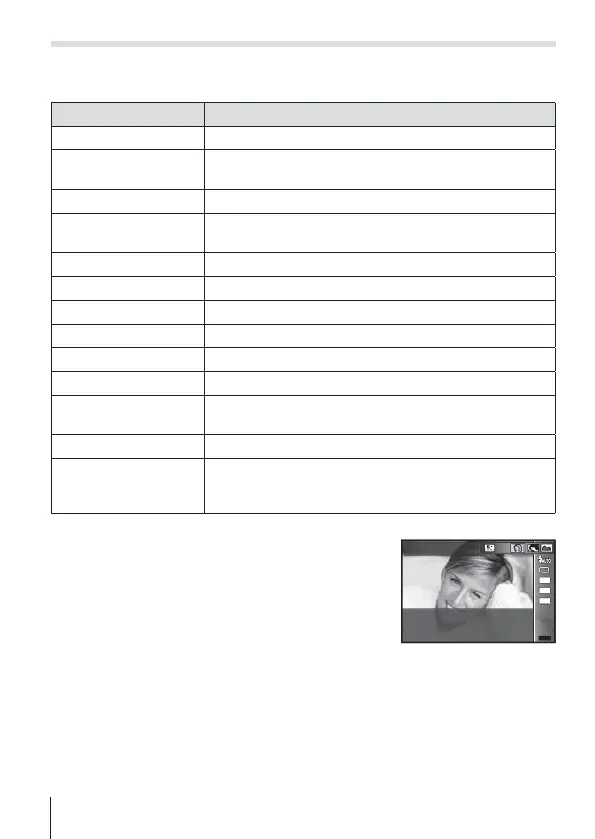
Only by selecting a sub mode according to the subject or the scene, you
can shoot with an proper setting.
Sub mode Application
B
Portrait Suitable for portrait shooting.
e
e-Portrait
Smoothes out skin tones and texture. This mode is
suitable when viewing images on a high-definition TV.
F
Landscape Suitable for landscape shooting.
1
Interval Shooting
Automatically shoot successive images according to
set [Start Waiting Time], [Frame], and [Interval Time].
C
Sport Suitable for fast action shooting.
2
Indoor Suitable for shooting portraits indoors like party scene.
3
Self Portrait Suitable for shooting yourself with holding the camera.
`
Sunset Suitable for shooting the sunset.
_
Cuisine Suitable for shooting cuisine.
^
Documents Suitable for shooting paper documents or time tables.
g
Beach & Snow
Suitable for shooting at snow-capped mountains,
seascapes in the sun, and other whitish scenes.
I
Super Macro Suitable for shooting extremely close-up images.
E
Backlight HDR
Suitable for contrasting scenes. This mode captures
multiple images and merges them into one, properly
exposed image.
1
Rotate the mode dial to O.
2
Use HI (arrow pad) to select a sub
mode and press the A button at the
end.
• Press the A button once again to display the
sub mode selection screen.
MENUMENU
16
M
4:3
Portrait
1080
• In [e-Portrait] mode, two images are recorded: an unmodified image and a
second image to which [e-Portrait] effects have been applied. When the image
size set to [!], a RAW file is created from an unmodified imge.


 To Next Page