EasyManua.ls Logo

Olympus VANOX-T - Page 39

Olympus VANOX-T
41 pages
Print Icon
To Next Page IconTo Next Page
To Previous Page IconTo Previous Page
Loading...
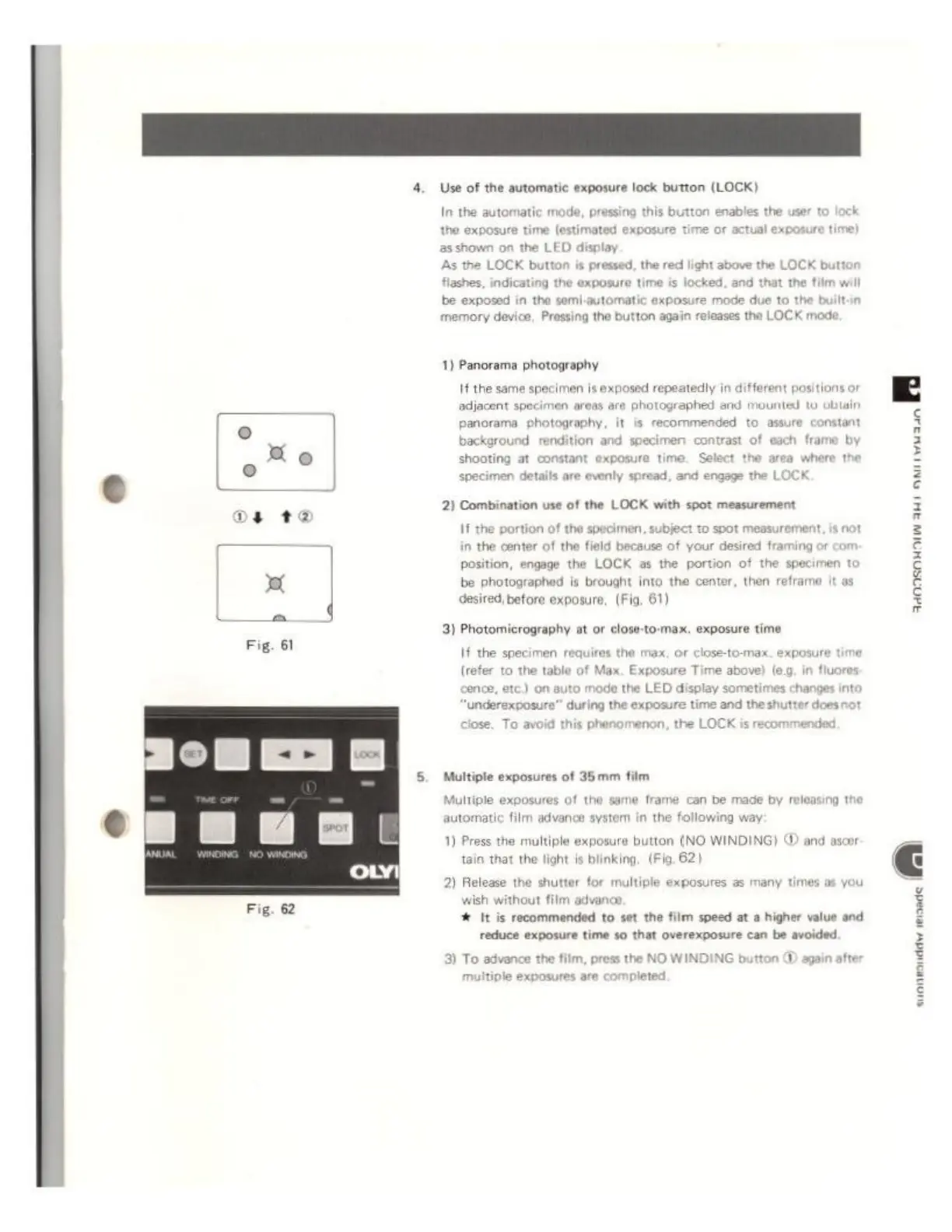
Fig.
61
Fig.
62
4.
Use
of
the
automatic exposure
lock
button
(LOCK)
In
the
automatic
mode,
pressing
this
button
enables
the
user
to
lock
the
exposure
time
(estimated
exposure
ti
asshown
on
the
LED
display
As
the
LOCK
button
is
pressed,
the
red
light
above
the
LOCK
button
flashes,
indicating
the
exposure
time
is
locked,
and
that
Y
be
exposed
in
the
semi-automatic
exposure
mode
due
to
the
built-in
memory
device,
Pressing
tho
button
again
releases
the
LOCK
mode
1)
Panorama
photography
If
the
same
specimen
is
exposed
repeatedly
in
different
positions
or
adiacent
specimen
areas
are
photographed
and
mounted
to
obtain
panorama
photography,
it
is
recommended
to
assure
constant
background
rendition and
specimen
contrast
of
each
frame
by
shooting
at
constant
exposure
time.
Select
the
area
where
the
specimen
details
are
evenly
spread,
and
engage
the
LOCK
2
Combination
use
of
the
LOCK
with
spot
measurement
11
the
portion
of
1
specimen,
subject
to
spot
measurement,
is
not
in
the
center
of
the
field
because
of
your
desired
framing
position,
engage
the
LOCK
as
the
portion
of
the
specimen
to
be
photographed
is
brought
into
the
center,
then
reframe
it
as
desired,
before
exposure,
(Fig.
61)
3)
Photomicrography
at
or
close-to-max.
exposure
time
If
the
specimen
requires
the
max,
or
close-to-max.
exposure
time
(refer
to
the
table
of
Max,
Exposure
Time
above)
leg.
in
fluoro
cence,
etc.)
on
auto
mode
the
LED
display
sometimes
changes
into
‘underexposure’’
during
the
exposure
time
and
the
shutter
d
se.
To
avoid
this
phenomenon,
the
LOCK
is
recom
ded.
5.
Multiple
exposures
of
35mm
film
Multiple
exposures
of
the
same
frame
can
be
made
by
releasing
the
automatic
film
advance
system
in
the
following
way
1)
Press
the
multiple
exposure
button
(NO
WINDING)
(D
and
asoor
tain
that
the
light
Ie
blinking,
(Fig.
62)
2)
Release
the
shutter
for
multiple
exposures
as
many
times
as
you
wish
without
film
advance,
%
It
is
recommended
to
set
the film
speed
at
a
higher
value
and
reduce
exposure
time
40
that
overexposure
can
be
avoided.
3)
To
advance
the
film,
press
the
NO
WINDING
multiple
exposures
are
completed
donsnMnlw
ami
nl
3
Β
š