2
4
.
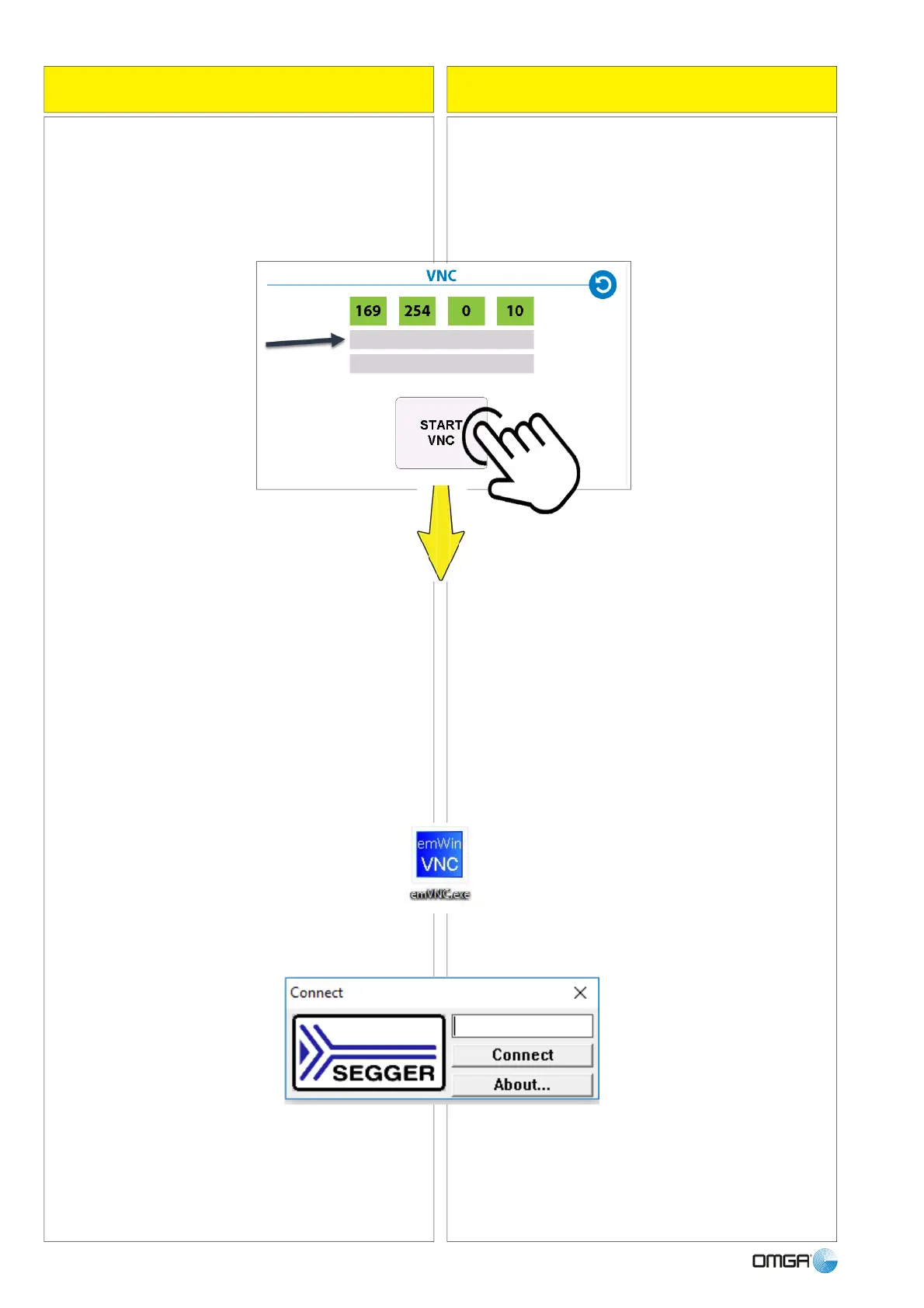
Andare su "START VNC" e attendare che appaia
indirizzo IP della macchina nella prima delle 2 righe
grigie
6
.
Riportare indirizzo IP della macchina nel tool
emVNC aperto in precedenza sul PC e cliccare
"Connect".
COLLEGAMENTO DI RETE e VNC
NETWORK CONNECTION and VNC
5. Lanciare da PC eseguibile emVNC.exe presente
nella chiavetta USB in dotazione e reperibile anche
al seguente
indirizzo internet:
vnc
https://www.segger.com/downloads/free-utilities#em
5. From your PC launch the executable file
emVNC.exe loaded on the USB flash drive supplied
with the machine, but also available at the following
internet address:
https://www.segger.com/downloads/free-utilities/em
vnc
6. Carry over the IP address of the machine into the
tool emVNC opened previously on the PC and
click "Connect".
4. Go to "START VNC" and wait until the IP
address of the machine appears on the first of the
two grey rows.



 To Next Page