The other meters—showing mostly light gray bars—are not normal level meters.
♦ The Composite meter on VOLT : FM shows the overall composite percentage, including
any subcarrier applied at the rear panel. The Composite meter is before any output level
control, and is calibrated 0 – 100%
♦ The Initial meter shows Gain Reduction at the wideband AGC. All Gain Reduction meters
are calibrated in amount of reduction, from 0 dB at the top (no change in volume) to -24
dB at the bottom (extreme leveling is being applied).
♦ If there are two meters above the Initial block button, the one on the right one shows the
activity in the Space-EFX stereo enhancer.
♦ The remaining light gray meters show Gain Reduction through the five single-band AGC
and Limiters, and the bass and wideband clipper.
♦ The bottom segment of each AGC meter turns red when automatic gating is active.
There’s a rectangular Block Button below each group of meters. These activate larger, higher
resolution versions of that button’s meter group.
When you press the Input block button, you’ll see an array of larger high resolution meters on
the left: Primary and Secondary (i.e., “Failover”) input level, send and return for the pre-clip-
per Insert (usually used for a watermark encoder or Voltair), and a zoomed-in higher resolution
version of the Insert return.
When you press a Block Button, a menu of related functions appears in the middle of the
screen. Click any one of these function menu buttons to see controls for that function.
3/16/2017 Remote Control
http://192.168.1.168/remote.html?sid=46a79fbc575a04eb0e12ab428729af30 1/1
Main Menu | Remote | LiveWire | GPIO / Events |File Transfer | Update | Configuration | About | Logout |
I/O PROCESSING
INPUT ANALOG AES LIVEWIRE COMPOSITE INITIAL AGC LIMITERS FINAL
AES Output
Analog
AES
Livewire
Composite
FM Options
AES De-emphasis
Master
-12.00 dBFS
Right
0.00 dB
Sample Rate
Current Preset: KILOWATT Current IO Config: AnalogInput STATUS
Function
menu
Parameter adjustmentDrop down menu
FunctionMenu1.1.pdf
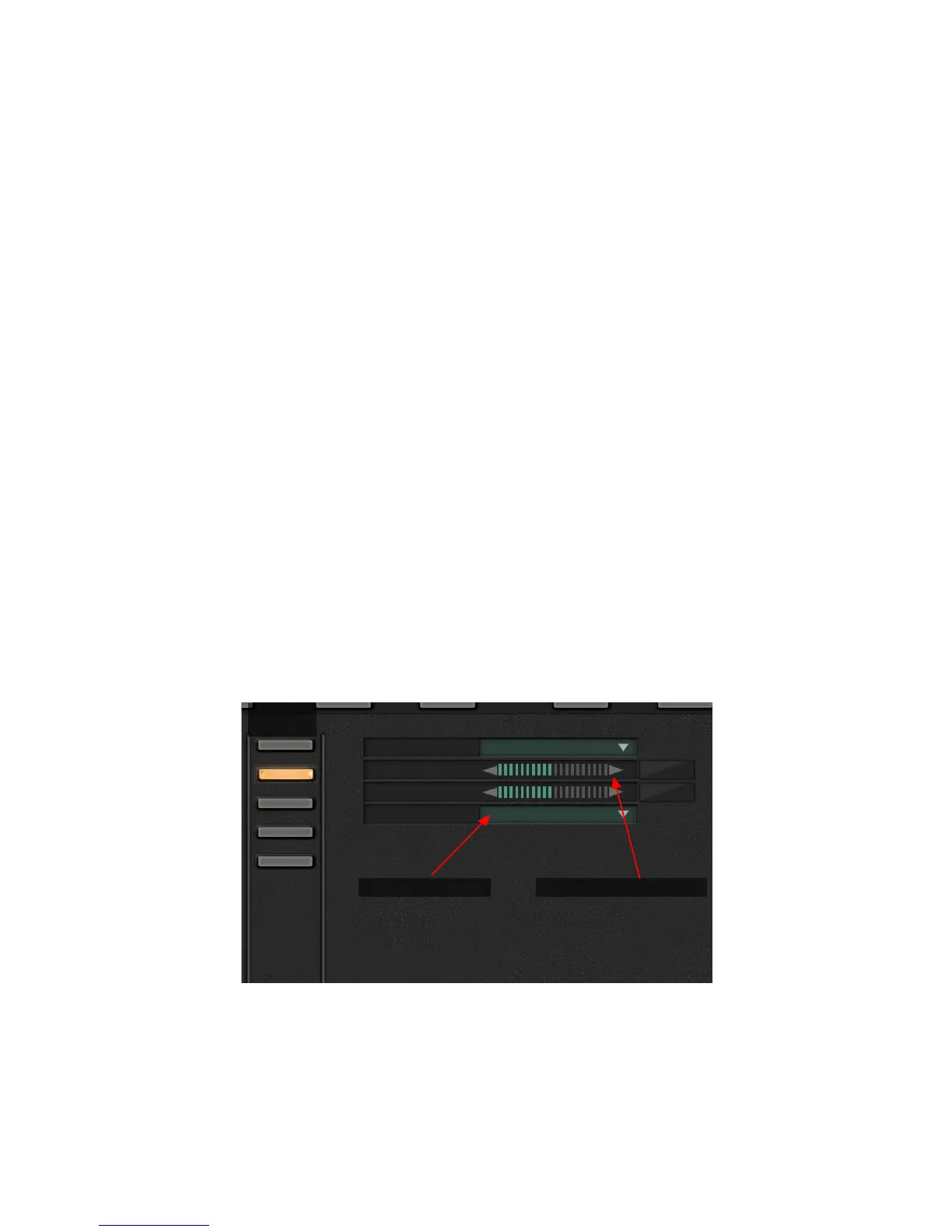
Function controls take two forms:
Parameter adjustments have triangles on either side of a horizontal meter. They let you incre-
ment a variable by clicking the left-facing triangle (reduce the value) or the right-facing one
(raise it). You can hold a triangle down for continuous incrementing. Range, scale, and units
when appropriate are displayed in the field to the right of the adjustment.
CHAPTER 5
| 31
BROWSER-BASED REMOTE CONTROL


 To Next Page