17
Enter
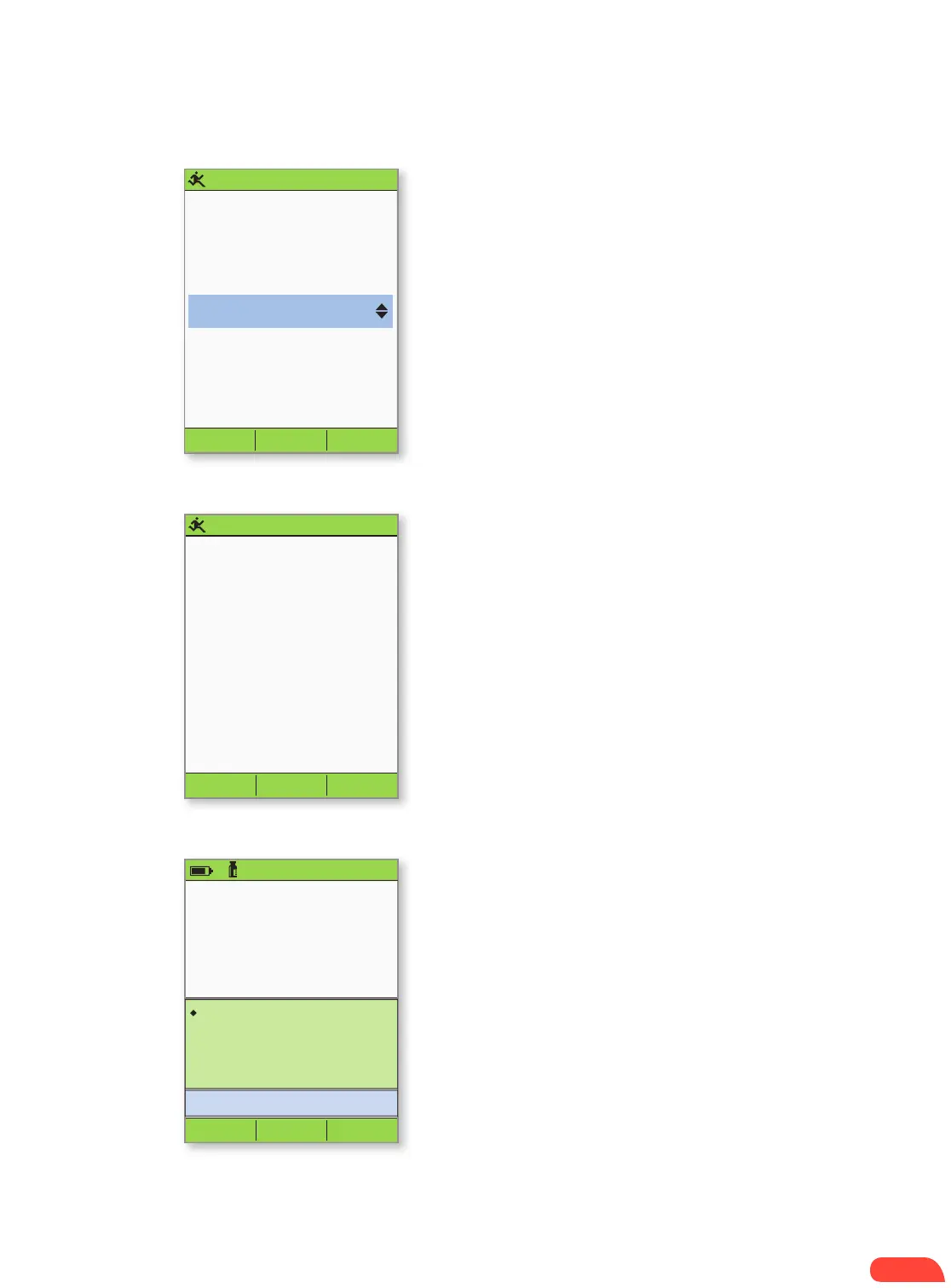
Enter duration for temp
basal.
Change: +25%
Back
0.5
hr
3:00p 2/11
Confirm
Start temp basal
increase?
Back
+25%
0.5
hr
3:00p 2/11
3:00p 2/11
Last BG 12 mmol/L
12:28
p today
Last bolus 1.00U
12:28p today
Temp basal
+25%
0:30 remains
Home
Pod exp 6:28a 2/14
50+U
+ Enter the length of time the temp basal should
be delivered (in half-hour increments), then
press Enter.
+ Press Confirm to start the temporary basal
rate shown on the screen (In this example,
25% more basal insulin will be delivered for
0.5 hours). The Pod beeps to indicate that
the temporary basal rate is running.
+ The Status screen indicates the temp basal
rate and the remaining delivery time.
3.
4.
5.
HOW TO ENTER A TEMPORARY BASAL RATE


 To Next Page