3
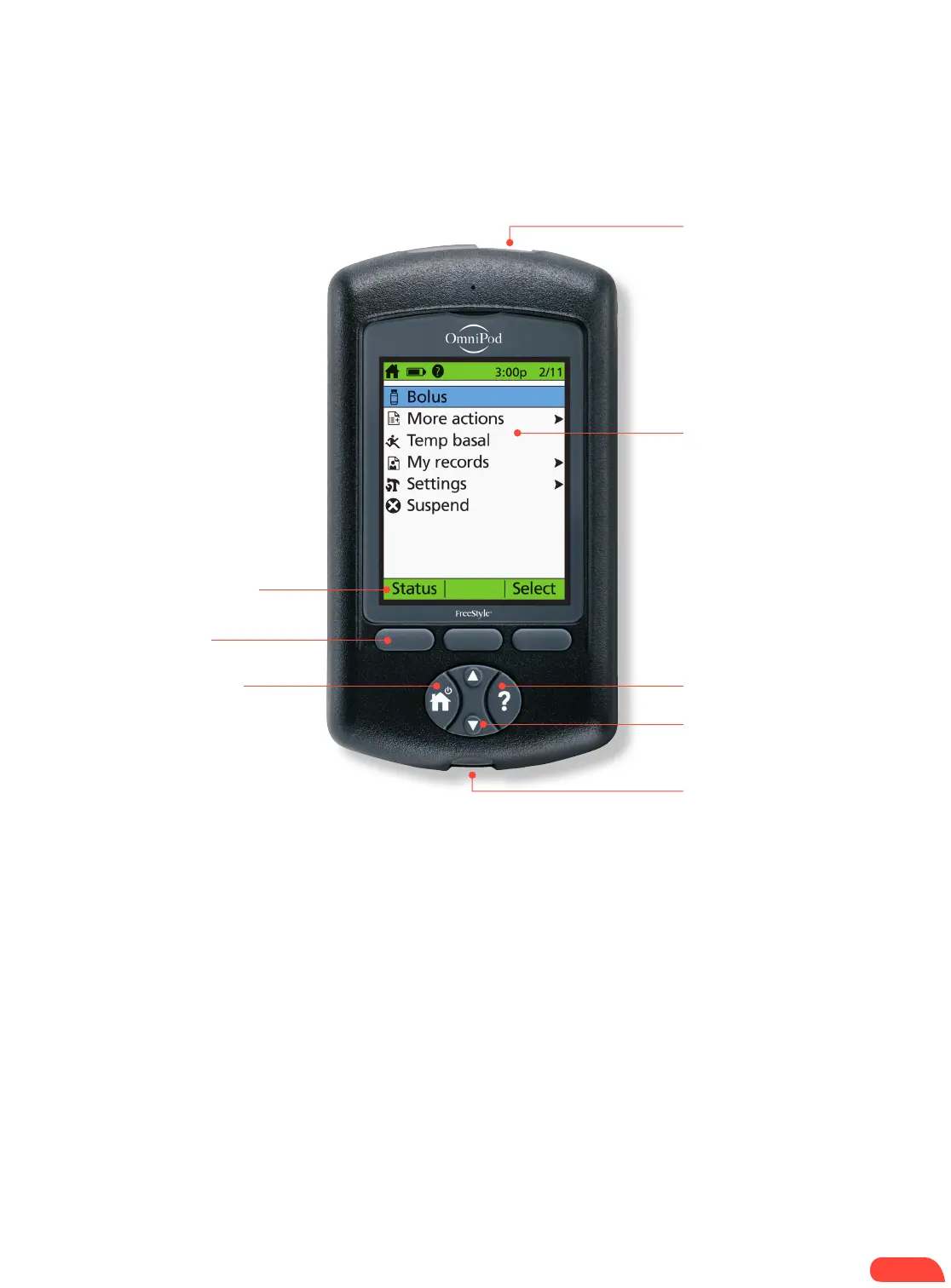
USB port
Soft key labels
Soft keys
Home/power
Color LCD screen
User info/support
Up/down controller
Test strip port
with light
MAIN MENU ITEMS
Bolus: Deliver bolus doses to cover
carbohydrates and/or correct high blood
glucose (BG) levels.
More actions:
+ Change the Pod
+ Add BG readings
+ Assign/Edit BG tags
Temp basal: Adjust insulin delivery for exercise
or illness according to the individual’s Diabetes
Management Plan. This menu item is present
only if the Temp basal option is turned on.
My records: Review insulin delivery, blood
glucose history, alarm history, carbohydrate
history, and personal user information.
Settings:
+ Enter, edit, and name basal programs
+ Program temp basal, carbohydrate,
and bolus presets
+ Customize system settings
Suspend: Temporarily suspend, cancel, or
resume insulin delivery programs
THE PDM
A wireless Personal Diabetes Manager (PDM) that’s simple to use.
PDM shown
at actual size
3


 To Next Page