23 24
Chapter 7. Functions
Commands
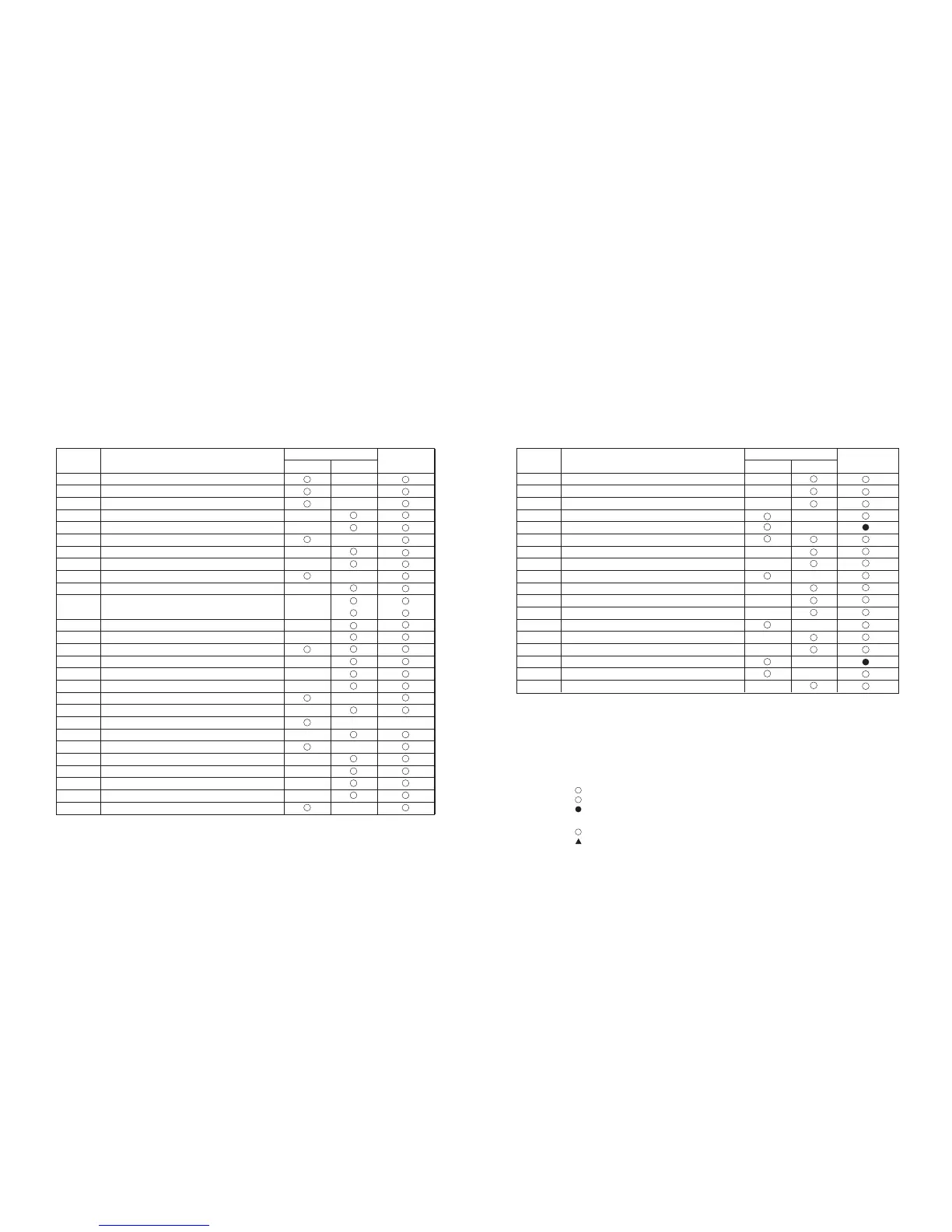
The commands listed in the table below are available for control of the printer.
Command
HT
LF
DLE EOT
ESC SP
ESC !
ESC $
ESC %
ESC &
ESC *
ESC -
ESC 2
ESC 3
ESC =
ESC ?
ESC @
ESC D
ESC E
ESC G
ESC J
ESC R
ESC S
ESC V
ESC \
ESC a
ESC c3
ESC c4
ESC c5
ESC d
Horizontal tab
Print and line feed
Real-time status transmission
Set right-side character spacing
Select print mode(s)
Set absolute print position
Select/cance user-defined character set
Define user-defined characters
Select bit-image mode
Turn under line mode on/off
Select 1/6-inch line spacing
Set line spacing
Select peripheral device
Cancel user-defined characters
Initialize printer
Set horizontal tab positions
Turn emphasized mode on/off
Turn double-strike mode on/off
Print and feed paper
Select an international character set
Select standard mode
Turn 90 clockwise rotation mode on/off
Set relative print position
Select justification
Select paper sensor(s)to output Paper-end signals
Select paper sensor(s) to stop printing
Enable/disable panel buttons
Print and feed paper n lines
Name
Command Classification
Executing Setting
Standard
Mode
( )
disabled
Command
ESC t
ESC {
GS !
GS $
GS /
GS :
GS B
GS H
GS I
GS L
GS P
GS W
GS ^
GS f
GS h
GS k
GS r
GS w
Select character code table
Turn upside-down printing mode on/off
Select haracter size
Set absolute vertical print position in page mode
Print down loaed bit image
Start/end macro definition
Turn white/black reverse printing mode on/off
Select printing position of HRI characters
Transmit print ID
Set left margin
Set vertical and horizontal motion units
Set printing area width
Execute macro
Select font for HRI characters
Set bar code height
print bar code
Transmit status
Set bar code width
Name
Command Classification
Executing Setting
Standard
Mode
( )
( )
( )
( )
Command classification
Standard mode
Disabled
Ignored
Executing :
:
:
:
Enagled
Enabled only when the command is used at the beginning of a line.
Enabled only when data is not present in the buffer.
Page mode
:
:
:
:
Enagled
Only setting is possible.
Parameters are processed as printable data.
Command codes and parameters are all ignored.
Printer executes the command, which does not affect the following data.
Setting : Printer uses flags to make setting, and those setting affect the following data.



 To Next Page