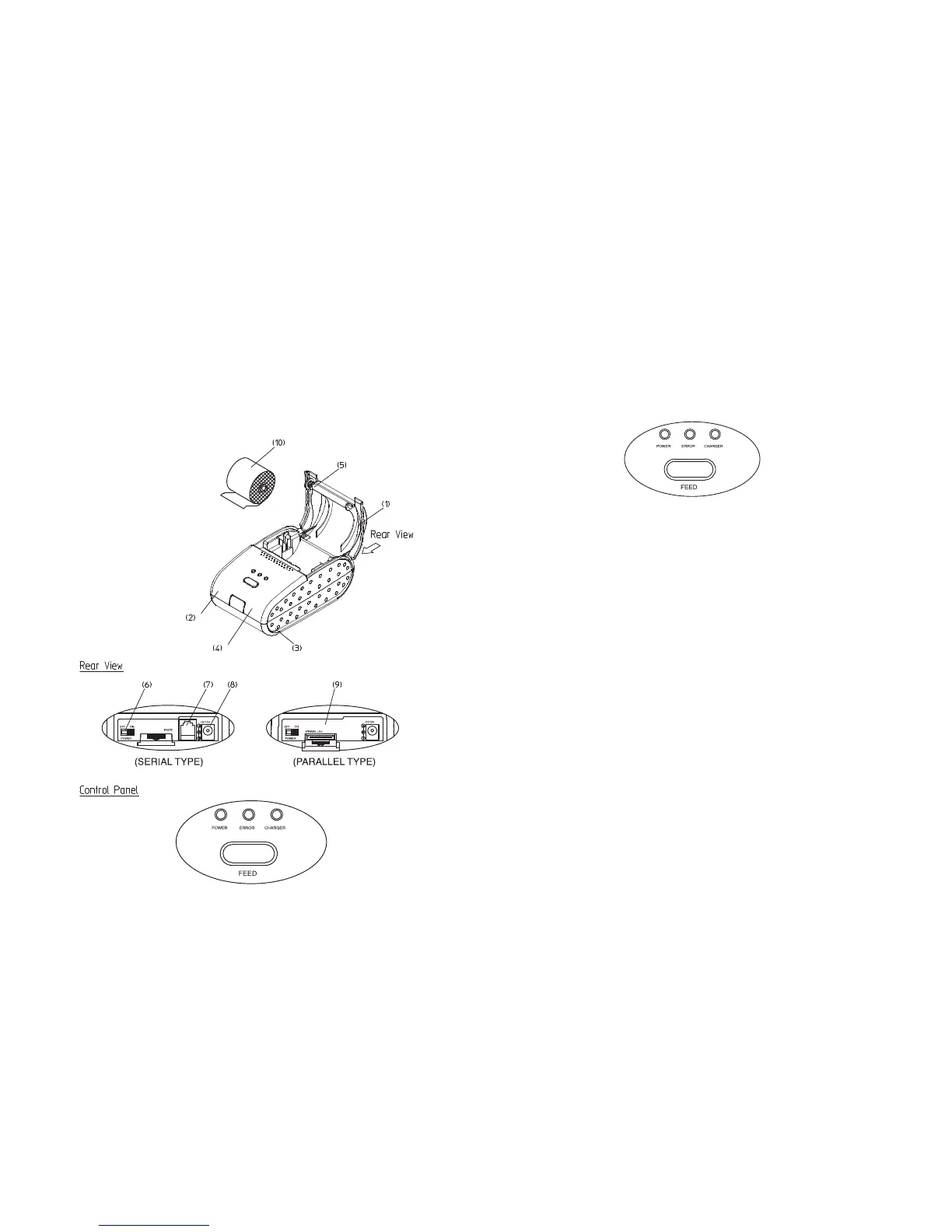
1-3. Printer Part Names
5
(1) Cover top
(2) Case top
(3) Case bottom
(4) Control panel
(5) Roller
(6) Power switch
(7) Interface connector(serial)
(8) DC Jack
(9) Interface connector(parallel)
(10) Roll Paper
Press the FEED button once to advance paper one line. You can also press the FEED
button continuously to feed paper continuously.
1-4. Operating Control Panel
The control panel has one button and three lights.
The control panel button perform paper feeding.
FEED
Button
- The ERROR light flashes when the paper roll is nothing. Install a new paper roll.
- Check up the Top Cover(Paper Cover) if it is locked.
The control panel lights provide information on printer conditions.
Green
- The POWER light is on when the printer power is on.
Orange
- The battery need to be recharged.
POWER
ERROR (Red)
- It is indicate battery power (Green, Red)
CHARGER
- The charger light is on When Battery is charged fully.
Green
- The charger lights is on when battery is under recharging.
Red
Indicator lights
6



 To Next Page