26
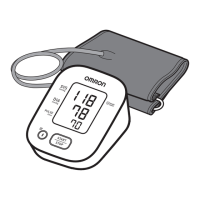
2. Gently fold the air tube into the arm
cuff.
• Do not bend or crease the air tube
excessively.
Do not store your monitor and other components:
• If your monitor and other components are wet.
• In locations exposed to extreme temperatures, humidity, direct sunlight, dust or
corrosive vapors such as bleach.
• In locations exposed to vibrations or shocks.
7.3 Wiping the Monitor
• Do not use any abrasive or volatile cleaners.
• Use a soft dry cloth or a soft cloth moistened with mild (neutral) detergent to wipe
your monitor and arm cuff and then wipe them with a dry cloth.
• Do not wash or immerse your monitor and arm cuff or other components in water.
• Do not use gasoline, thinners or similar solvents to wipe your monitor and arm cuff
or other components.
7.4 Disposal
Dispose of your monitor, other components and optional accessories according to
applicable local regulations.
Unlawful disposal may cause environmental pollution.


 To Next Page