EasyManua.ls Logo

Omron BP629 - User Manual

Omron BP629
27 pages
Print Icon
To Next Page IconTo Next Page
Loading...
ESPAÑOL
ENGLISH
3 series
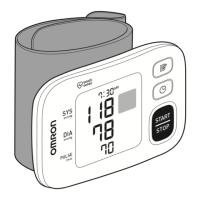
Automatic Wrist Blood
Pressure Monitor
Model BP629
INSTRUCTION MANUAL

Questions and Answers

  • S
    samantharossJul 26, 2025
    How to fix no power on Omron Blood Pressure Monitor?
    • C
      Corey MooreJul 26, 2025
      If your Omron Blood Pressure Monitor has no power and the display is blank, replace both batteries with new ones at the same time. Also, double-check that the batteries are installed correctly, paying attention to the proper placement of the battery polarities.
  • R
    Robin PattonAug 6, 2025
    Why does my Omron Blood Pressure Monitor show measurement values that appear too high or too low?
    • J
      James KelleyAug 6, 2025
      Blood pressure is not a constant value and varies constantly. Several factors, such as stress, the time of day, and how you wrap the cuff, can affect your blood pressure readings. Please refer to the sections '%HIRUH 7DNLQJ D 0HDVXUHPHQW' and '7DNLQJ D 0HDVXUHPHQW'.
  • G
    Gregory AndrewsAug 14, 2025
    What to do if my Omron Blood Pressure Monitor has no power and no display appears?
    • M
      Mary BartonAug 14, 2025
      If your Omron Blood Pressure Monitor has no power and the display is blank, replace both batteries with new ones at the same time. Also, check the battery installation to ensure the correct placement of the battery polarities.

Summary

Introduction

Safety Information

Operating the Device Safety

Key safety precautions and warnings for operating the blood pressure monitor.

Care and Maintenance

Before Taking a Measurement

Know Your Unit

Unit Components Overview

Identifies the main unit parts and included components.

Unit Display Overview

Display Symbols

Irregular Heartbeat and Movement Error Symbols

Explains symbols indicating irregular heart rhythm or measurement errors.

Battery Installation

Setting the Date and Time

Applying the Wrist Cuff

Applying the Cuff on the Left Wrist

Step-by-step guide for correctly applying the cuff to the left wrist.

Taking a Measurement

Using the Memory Function

Averaging Function

Explains how the monitor calculates average readings from recent measurements.

Displaying Measurement Values

How to view stored measurement results and averages.

Care and Maintenance

Error Indicators

Troubleshooting Tips

FCC Statement

Limited Warranty

Specifications

Omron BP629 Specifications

General IconGeneral
TypeAutomatic
Display typeLCD
Product colorWhite
Number of users1 user(s)
Speaking functionNo
Placement supportedWrist
Mean arterial pressureYes
Battery technologyAlkaline

Related product manuals